Previewed Modelling Tools
These tools are development changes after RC2. They share the temporary Modelling Tools dock and the existing model canvas; there is no new main workspace. Open Edit > Transform Selection, Tools > Beam / Frame Generator, or Edit > Merge Two Nodes. The tool selector switches forms inside the dock. Length entries use the project's displayed units.
Preview → Apply → Cancel
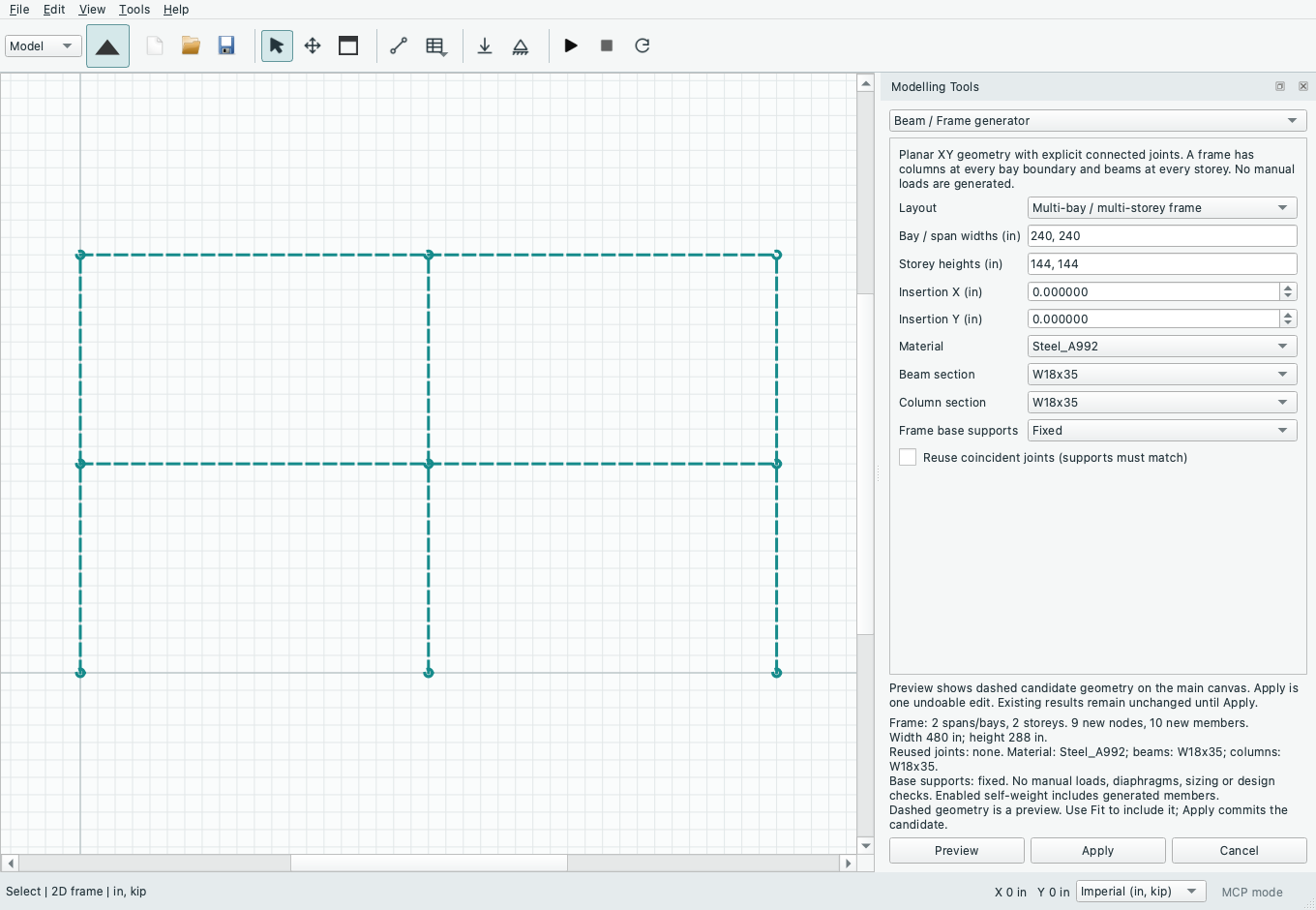
Preview captures the current definition and selection, validates a separate candidate and draws changed/new geometry as dashed accent lines with node markers. Existing geometry remains visible; in 3D the ghost geometry cannot be picked or box-selected. Use Fit to include the preview. Supports and loads are listed in the preview summary rather than drawn as candidate symbols. Apply commits the reviewed candidate as one undoable edit and invalidates numerical results. Cancel, Escape or hiding the dock clears the preview without changing the project. Editing inputs or the model clears it too; a candidate cannot be applied to a changed definition. Reopen the tool after changing units or opening another project to rebuild its inputs in the new context.
Move, repeat, rotate and mirror
Select nodes and/or members first. Members include their end nodes; moving a shared node also changes incident unselected members, whose count is reported before Apply. Move uses a global offset. Repeat / linear array makes 1–50 additional copies at successive multiples of a global XYZ step, like a CAD linear pattern. Rotate uses a global axis and reference point; Mirror reflects across the plane normal to the selected global axis through that point. Planar models remain in XY: rotation about Z and reflection normal to X or Y. Rotate and Mirror optionally retain the originals.
Separate switches copy manual loads and global supports/springs; both default off. Copied member loads retain their normalized start/end stations, intensities, cases and local/global direction definitions. End IDs/order, sections, materials, member type and planar releases retain their meaning. Global forces, angled loads and support/spring axes stay global; they are not rotated with geometry. Local loads follow the transformed member axes. For 3D rigid transforms, local y follows the transformation and local z is reconstructed by the right-hand rule, including reflections. Self-weight remains global gravity on all included members. Groups, named levels, surface recipes and surface pressures are not copied. Moving existing frame joints in projects with surface recipes is blocked because that needs a coordinated coupling edit; copying frame geometry is allowed.
Coincident-node reuse is explicit and off by default. Enabling it creates shared joints within the canonical 1e-8 inch connection tolerance. Existing supports remain when support copying is off; copying incompatible supports is blocked. Copied nodal loads remain separate and add at reused joints. Duplicate members, new overlaps, implicit crossings and new unsplit interior joints are blocked; adjust the placement or split/connect geometry explicitly. Independent copies may remain disconnected and require connection/supports before analysis.
Beam and frame generators
The generator creates ordinary editable planar XY nodes and frame members. Enter comma-separated span/bay widths and storey heights (up to 40 each), an XY insertion point, one material and separate beam/column sections. Continuous beams have a pin at the first joint and vertical rollers at the other joints, with unreleased connected spans. Frames have columns at each bay boundary, beams at every elevated storey and explicitly chosen Free, Pin or Fixed base supports. The preview reports counts, dimensions, properties and assumptions. Coincident joint reuse requires matching supports. Operations are limited to 2,000 candidate nodes plus members. No manual loads, diaphragms, automatic sizing or code design are generated; enabled self-weight includes added members. A generator describes a connected structural layout, whereas Repeat copies a selection at offsets.
Reviewable node merging
Choose a retained node, a removed node and a maximum merge distance. The retained node keeps its coordinates. Preview redirects all removed-node member endpoints, nodal load targets and saved group references; it never deletes members or loads. Conflicting supports/springs require a choice to keep either node's support. When both nodes have manual loads, explicitly allow keeping both additive load sets. Zero-length/duplicate members, new crossings, overlaps and implicit joints are rejected. Merging with surface recipes is blocked pending coordinated coupling support. Model Findings > Review node merge opens this same tool for findings that reference at least two nodes; otherwise select nodes and use the Edit menu. This is a controlled two-node repair, not a tolerance-based automatic cleanup.
Source: GUIDE.md. This manual follows the current repository; the published rc1 wheel has a smaller feature set.