Examples, Themes and Preferences
Use File > Browse Examples for a searchable native catalog. Filter by category or type words from a title, description or expected check. Selecting a row shows an undeformed geometry sketch, model size/method, loading summary and combinations. Loads follow the editor's current display units; reference checks state their own units explicitly. The sketch omits load arrows and uses a fixed axonometric view for spatial models; inspect full supports/loads in the editor after opening. It is not a solved result or an interactive analysis viewport. Surface meshes and moment-release rings are included in the geometry preview.
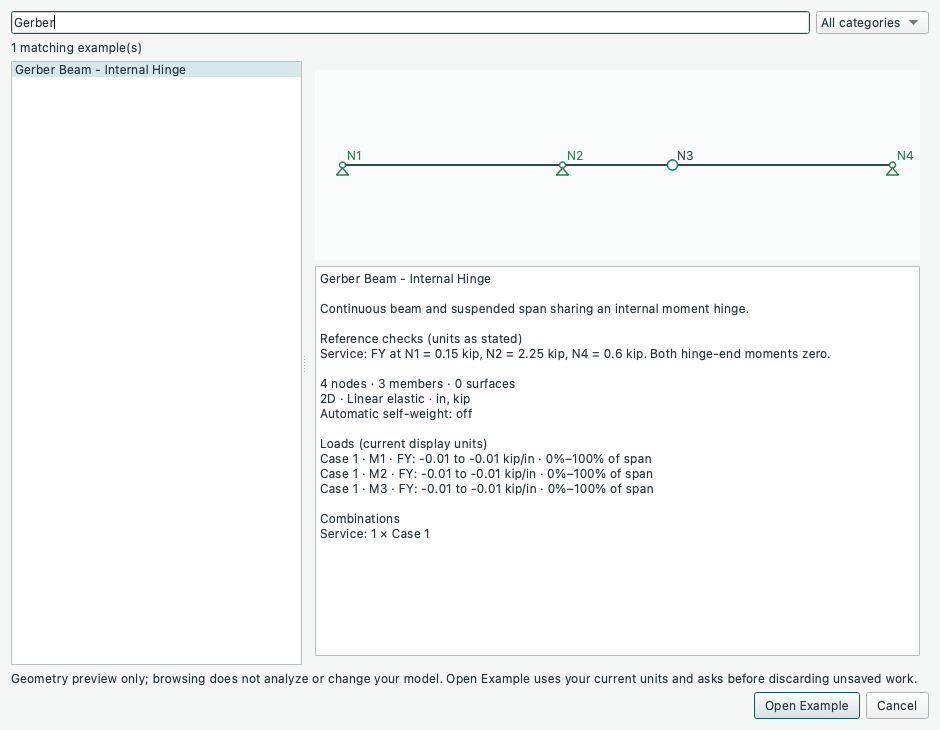
Open the image for full-size text. Search Gerber to review its internal hinge
and the three support reactions before opening the model.
Browsing does not run analysis, edit the current project, replace its results or discard unapplied Properties input. Open Example (or a double-click) loads a fresh example in the current units after the normal unsaved-work prompt; Cancel leaves the current model intact. A search with no matches clears the preview and disables Open Example. The browser follows Light/Dark appearance and is unavailable while MCP mode locks manual controls. The categorized File > Examples menus remain available for direct loading.
- The unit selector also offers SI (mm, N) and Imperial (ft, kip). The mm/N preset uses N-mm moments, N/mm line loads, MPa stresses, and mm2/mm4 sections. The ft/kip preset uses kip-ft moments and kip/ft line loads, while keeping section properties in in2/in4 and material stiffness in kip/in2. Weight density follows the geometry volume units (N/mm3 or kip/ft3).
- File > Examples organizes fresh, editable models in 2D Frames, 3D Frames, Trusses, Slabs and P-Delta submenus. The beam, portal, continuous/pitched/ two-storey frames, self-weight, elastic-base and release examples are in 2D Frames; cantilever/space frames are in 3D Frames. Both planar and spatial trusses share Trusses. Examples retain the current unit system and prompt before replacing unsaved work. They start as unsaved projects, not as files to overwrite.
- Slabs > Three-Storey Frame and Slabs (Experimental) has three 12-foot storeys, four fixed-base steel columns, a 20 by 15 foot perimeter frame at every level, and three 6-inch elastic concrete Quad slabs with a 60-inch mesh. The frame centrelines and slab midsurfaces share conforming joints. All floors carry 0.001 kip/in2 Dead pressure; Floors 1/2 carry 0.0005 kip/in2 Live, and Floor 3 carries 0.00025 kip/in2 Live. Positive XZ pressure acts downward. The default Gravity combination is Dead + Live: 183.6 kip total, 45.9 kip vertical reaction per base. Dead gives 32.4 kip per base; Factored (1.2 Dead + 1.6 Live) gives 60.48 kip per base. These are illustrative factors. Only prescribed pressure loads are applied; automatic self-weight is off. Coupling is already enabled and the analysis method is Linear elastic. Use the Surfaces tree to select each floor and Deformed to see its displacement.
- P-Delta > Slender Column - Gravity and Lateral Load opens a 480-inch planar fixed-base column with eight 60-inch frame segments, a 60-kip downward Gravity tip load and a 1-kip horizontal Lateral tip load. P-Delta elastic is already selected. The default Combined result has approximately 3.9919 in tip DX; Lateral alone gives 2.4925 in. Choosing Linear elastic in Edit > Analysis Method gives 2.4925 in for Combined too. This demonstrates axial-load-dependent amplification without material yielding. Gravity alone has zero lateral sway. See Analysis and Force Diagrams for the second-order force-recovery/equilibrium limits; the strict force-residual check is not relaxed for this example.
- P-Delta > Column - Imposed Base Motion uses the same segmented column and loads, with base DX +0.03 in and RZ +0.0007 rad. Every combination keeps those movements. Base motion only has zero applied loads and a straight rigid-motion field, with tip DX -0.306 in and no member forces. Gravity amplifies the response to the base rotation; load factors do not scale it.
- 2D Frames > Official PyNite - Beam with Point Loads / Uniform Load /
Factored Envelope adapts the three corresponding
official beam scripts
from source revision
e3a0bbd912b6cf13140f01ca0ed3a2ee55069f45. Each has a 168-inch span, custom Steel material (E = 29000 ksi, nu = 0.3, density = 0.0002836 kip/in3) and MySection (A = 20 in2, Iy = 100 in4, Iz = 150 in4, J = 250 in4). Both ends restrain X/Y with free in-plane rotations, matching the source's in-plane supports; automatic self-weight is off. The original 420-inch Simply Supported Beam remains a separate starter model. - Official point loads: D = -5 kip and L = -8 kip at midspan. Choose 1.2D+1.6L after analysis: both vertical reactions are 9.4 kip, midspan local Mz is -789.6 kip-in and midspan dy is -0.42692855 in. 1.4D gives 3.5 kip reactions and -0.15896276 in midspan dy.
- Official uniform load: -200 lb/ft over the whole beam, retained as -0.01666667 kip/in. Combo 1 gives 1.4 kip at each support, midspan Mz -58.8 kip-in and dy -0.03974069 in.
- Official factored envelope: preserve the executable source's positive D = +5 kip at 48 in and S = +8 kip at 108 in, plus L = -8 kip at 144 in. These signs intentionally follow the code rather than its misleading downward load comment. Analyze, open Diagrams > Envelopes and keep all three combinations checked. The Members summary gives minimum Mz -222.17142857 kip-in governed by 1.2D+1.6L, and maximum Mz +596.57142857 kip-in governed by 1.2D+1.6S.
The official beam adaptations use the existing planar, linear-elastic workflow.
The source scripts call the general iterative solver, but these bilateral elastic
models need no active-set iteration. Out-of-plane/torsional DOFs and renderer/PDF
calls are replaced by the GUI's existing planar editor, diagrams and print tools.
These earlier planar adaptations retain derived G = E/[2(1+nu)] (11153.846 ksi), whereas the scripts also specify
G = 11200 ksi; this does not affect their in-plane Euler-Bernoulli bending/axial
responses. Upstream strength combination tags are represented by explicitly
checking the same three combinations in Envelopes. Plot sampling/amplification
remain GUI controls. The upstream MIT notice is distributed in
src/pynitegui/qt/licenses/pynite-examples.txt; the application license is unchanged.
Three further official adaptations use the same pinned source revision and MIT notice:
- 2D Frames > Official PyNite - Moment Frame with Lateral Load retains the
180 by 144 inch frame, W10x33 column and W8x24 beam properties, fixed bases,
prescribed member-local D weights and 10-kip global-X wind at N2. Its method is
P-Delta elastic, as in the executable upstream script. For 1.2D+1.0W,
N2 DX is 0.48084117 in; N1 FY is -2.10031058 kip (uplift). For
0.9D+1.0W, those values are 0.48079378 in and -2.27287188 kip.
Self-weight is represented by the source's explicit distributed loads, so
automatic self-weight remains off. Original member IDs and the unsplit
three-member layout are retained. The beam-example planar/G adaptation above
also applies. A frozen reference from the pinned script and locked engine is
stored in
tests/fixtures/official_moment_frame.json; it is an adapter parity check, supplemented by separate load-resultant checks. - P-Delta > Official PyNite - P-Delta Column converts the source's 20-foot column to 240 inches, with E = 29000 ksi, A = 10 in2, Iy/Iz = 100 in4, J = 200 in4 and a fixed base. Combo 1 applies 100 kip downward and 5 kip laterally at N6. The source's six nodes become five explicit 48-inch members, replacing automatic physical-member subdivision. Tip DX is approximately 40.2722 in; the analytical tangent reference is 40.2740 in, approached by refinement. The base Mz is approximately 5227.21 kip-in. This is the original elastic benchmark, distinct from the milder Slender Column example. Both official second-order examples keep the existing strict force-residual check: PyNite's approximate recovery can flag small residuals. An analytical comparison does not override the Equilibrium tab or imply plasticity.
-
Trusses > Official PyNite - Space Truss with Nodal Load converts the source's metre/kilonewton geometry, loads and section/material quantities to canonical inches/kips. Select SI (m, kN) for comparison. The original A–E joints and AB/AC/AD/BC/BD/BE member IDs are retained. Loads at A are (10, 60, 20) kN in global X/Y/Z; C/D/E remain fixed. In the member axial results, BC = -32.65333 kN, BD = -45.23538 kN (tension) and BE = +112.05467 kN (compression). All six members use bilateral axial-only elements, replacing the source's released frame members (including its unreleased AB). This reproduces the statically determined bar forces; it is not a torsional/released-frame displacement benchmark. Original EA is kept, giving negligible elastic displacement; unused free-joint rotations are n/a. Source G is not used by axial-only bars. The isotropic GUI G therefore has no effect on these bar responses. Automatic self-weight is off.
-
Plates (Experimental) > Official PyNite - Clamped Rectangular Quad Plate adapts
Rectangular Plate Bending - Qauds.py(upstream spelling) at the same pinned source revision. It opens the existing separate plate workspace, also available through Browse Examples, without discarding or changing the frame editor. The undeformed preview does not solve. Inputs are editable and save to.pyniteplate, retaining your current display units. The XY plate is 10 × 20 ft, 1 ft thick, with a 1 ft mesh (200 Quads, 231 nodes), nu = 0.17, E = 57000 sqrt(4000) psi and density 150 pcf. All four edges are clamped. W applies +250 psf along global +Z, with self-weight off: total applied load +50 kip, normal support reactions -50 kip, and peak normal displacement +0.00191955 in. The source's thin-plate reference is +0.00171054 in; DKMQ retains transverse shear deformation. Do not interpret that difference as a failed convergence check or a cracked-concrete model. This example's primary combination is Plate = 1.0W, equivalent to the source's 1.0W. Its existing transverse-only constraints additionally restrain interior membrane translations and drilling rotation. For this flat uniform-pressure benchmark they leave transverse nodal displacements, reactions and element-centre moments equal to the original full shell model; this is not a general membrane/shell equivalence. PyNite Quad uses E/nu rather than the supplied independent material G, so the source's G = 0.4E does not block this adaptation. Plate contours show element-centre values rather than the upstream renderer's smoothed corner extrema. Full upstream contour extrema and the source's renderer are not reproduced.
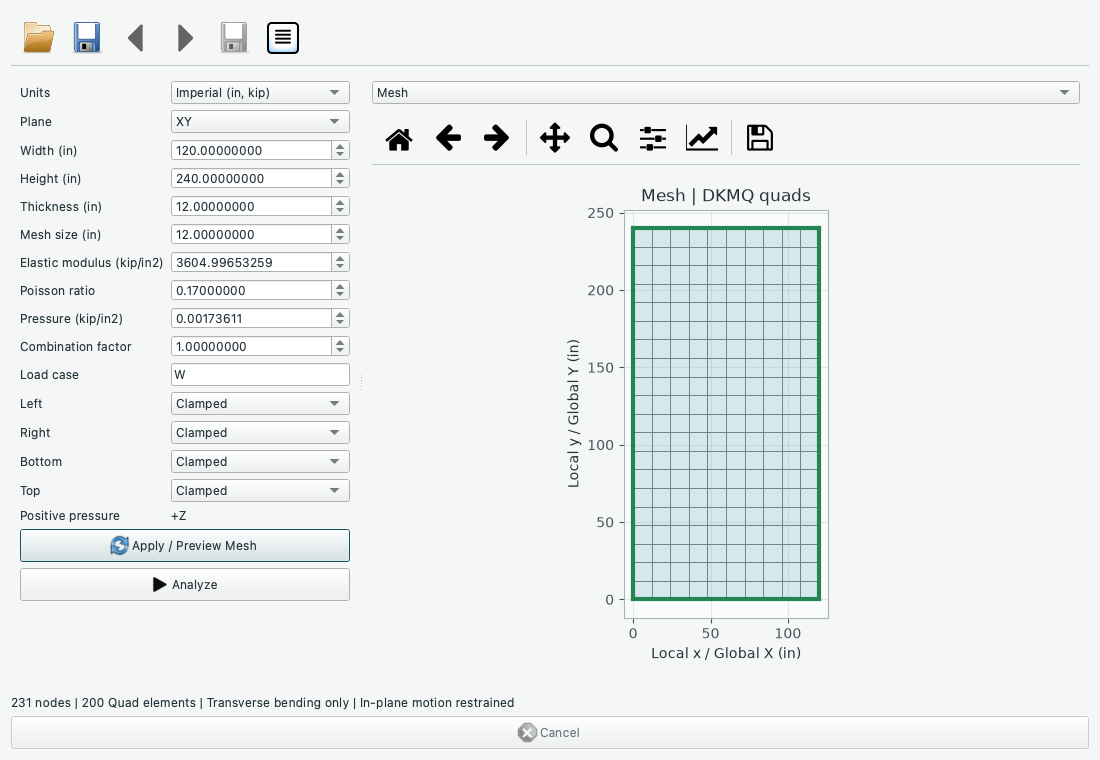
The official plate opens as an unsolved mesh preview. Use Analyze for its transverse displacement and element-centre moment/shear contours, or Save plate for an editable copy.
The official catalog audit covers all 20 scripts: nine are adapted; eleven still depend on capabilities outside the current app. No substitute model is presented as a completed official adaptation.
| Remaining official example | Required capability before adaptation |
|---|---|
| Beam on Elastic Foundation | Compression-only support springs and lift-off iteration. |
| Braced Frame - Spring Supported | Unilateral axial spring elements and their instability handling. |
| Braced Frame - Tension Only | Tension-only braces and active-set analysis. |
| Rectangular Wall - Linear Varying Load | Depth-varying pressure and validated shell boundary assignment; current pilot pressure is uniform. |
| Shear Wall - Basic | Validated in-plane membrane/drilling supports, loads and wall result recovery. |
| Shear Wall - Advanced | Shear-wall/story/pier/coupling-beam APIs and modifiers, plus validated membrane/drilling response. |
| Mat Foundation | Mat/soil contact API, compression-only soil springs, foundation point force/moment assignment. |
| Circular Bin with Conical Hopper | Curved-shell assembly, merged interfaces, varying pressure and shell support/results. |
| Modal Analysis | Mass/modal solve and mode-result workflow. |
| Moment Frame - Pushover / Pushover Analysis | Plastic section definitions, incremental pushover controls, hinge-state results. |
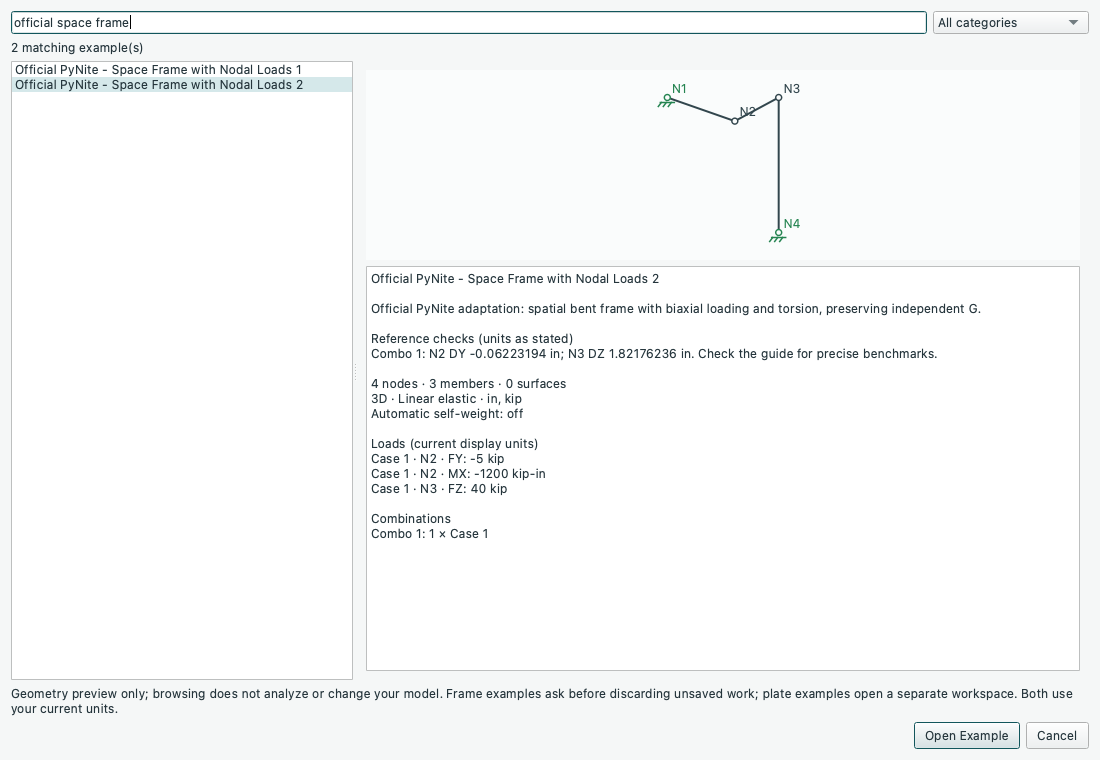
3D Frames > Official PyNite - Space Frame with Nodal Loads 1 / 2 now preserves both original models at the same pinned revision, including independent G = 10000 ksi with E = 30000 ksi and nu = 0.3. Both use the existing linear-elastic spatial workflow with Combo 1, unchanged member directions/zero roll, nodal forces/moments and automatic self-weight off. They open as editable, unsolved projects from the menu or Browse Examples.
- Space Frame 1 retains three 100-inch orthogonal arms, fixed nodes N2/N3/N4, A = 10 in2, Iy = Iz = 100 in4, J = 50 in4 and N1 FY = -50 kip / MX = -1000 kip-in. N1 translations are (+0.00007098258, -0.01399513491, -0.00235188934) in; rotations are (-0.00399609044, +0.00001780069, -0.00010334290) rad.
- Space Frame 2 retains the 120/120/240-inch spatial bent frame, fixed N1/N4, A = 100 in2, Iy = 200 in4, Iz = 1000 in4, J = 100 in4 and N2 FY = -5 kip, N2 MX = -1200 kip-in, N3 FZ = +40 kip. Computed N2 DY is -0.06223193794 in and N3 DZ is +1.82176235817 in. The script's printed textbook targets (-0.063, +1.825) differ slightly from its executable model; they are not exact acceptance values for the current engine.
Regression checks compare all nodal translations/rotations/reactions and member
end forces against both hash-checked upstream-source results and a separately
assembled Euler-Bernoulli stiffness calculation. Reference capture is repeatable
with scripts/capture_official_space_frames.py; the committed fixture includes
source revision, SHA256 and engine version, and tests run offline. This adds
material input and examples, without adding a solver method.
- View > Appearance selects Light or Dark. The preference is saved between app sessions, separately from project files. It updates all open editor/diagram windows, including the grid, engineering symbols, labels, tables, and plots, without changing units, undo history, results, inspection positions, or plot zoom/navigation history. Printed reports remain light for paper/PDF output. Properties scroll when the dock is too short for all fields.
- Choose Imperial or SI from the unit selector at the bottom-right, or use Edit > Units. All dimensional inputs, inspectors, coordinate readouts, load labels, property tables, results, and open diagrams use the selected system. Switching is undoable, preserves the physical model and valid results, and is saved with the project. New projects keep the currently selected system.
2D Frames > Gerber Beam - Internal Hinge has nodes at x = 0, 120, 180 and 300 in, with a pin at N1, rollers at N2/N4 and a shared internal hinge at N3. Three members carry -0.01 kip/in global-Y distributed load. The suspended 120-inch right span supplies 0.6 kip at the hinge and 0.6 kip at N4. On the left assembly, equilibrium gives N2 FY = 2.25 kip and N1 FY = 0.15 kip. Local end moments at the shared hinge are zero; local Mz over N2 is +54 kip-in.
2D Frames > Three-Hinged Polygonal Arch has nodes (0,0), (60,60), (120,96), (180,60), (240,0) inches, pinned bases and a shared crown moment hinge. Each of the three upper joints carries -5 kip FY. Vertical base reactions are 7.5 kip each; horizontal thrust is +6.25 kip at N1 and -6.25 kip at N5. Crown-end moments are zero. Both examples use Linear elastic, default steel and W18x35 properties, and no automatic self-weight. The hinge releases both adjacent member-end moments while retaining shared translations; its unused joint RZ is n/a. These are straight-segment frame examples, not curved elements. Create 3D Copy preserves their RZ hinges. Use its planar-restraint option to compare the same in-plane response; review all supports before a six-DOF solve.
See the illustrated first-model walkthrough for views of the three-storey slab and P-Delta examples, including the expected reactions and tip displacement to check after analysis.
Source: GUIDE.md. This manual follows the current repository; the published rc1 wheel has a smaller feature set.