Combination Envelopes
Compare Combinations in the 2D and 3D diagram windows overlays two solved combinations for a chosen member and local result component. A is solid and B is dashed; both use the same numerical axes and scale. Choose a distance or click the plot, then select Left side or Right side at a concentrated load. The probe shows both signed values and the governing combination by largest absolute value; A wins ties. This is a station comparison, not a solver-extrema search. Selecting the same combination twice is allowed as an identity check.
Both selectors belong to the retained analysis snapshot and method. They are independent of the window's single-combination selector, and changing the editor or solving again cannot replace either curve. The snapshot status above the tabs indicates when the retained result differs from the editor. Unit and theme changes retain the comparison and physical probe distance. The plot toolbar saves PNG/SVG with both combination names, snapshot identity, units and probe context. The comparison does not rerun analysis or edit the model.
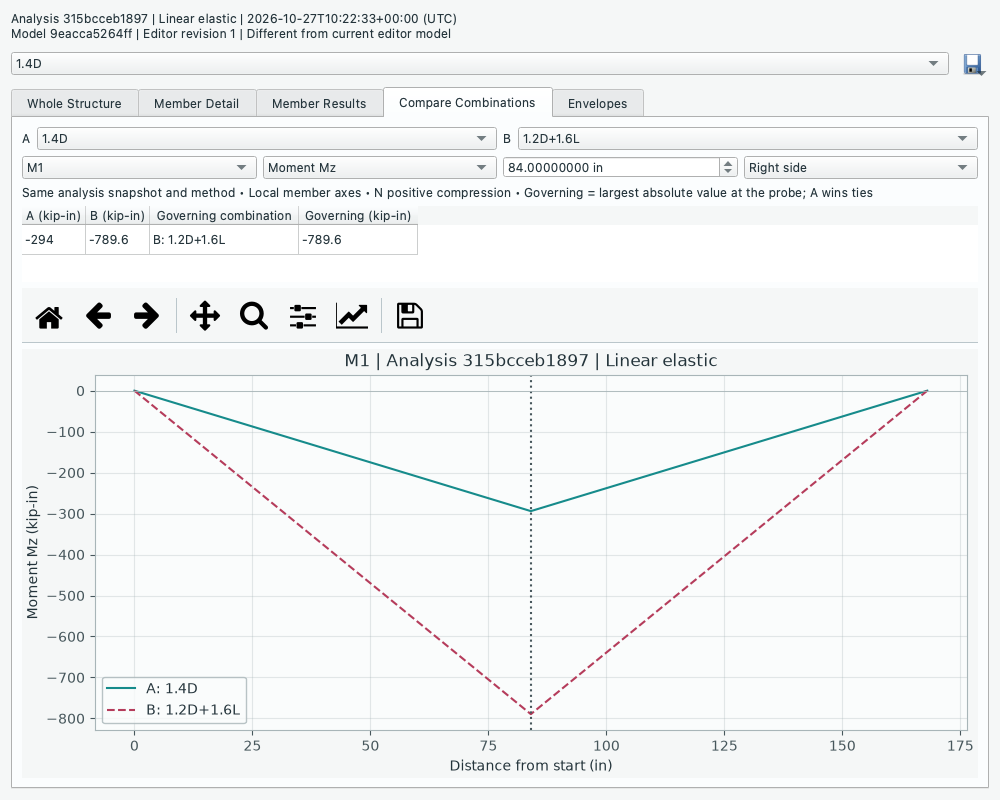
The official point-loaded beam compares 1.4D with 1.2D + 1.6L. The probe reports the signed moment for each; the larger absolute moment governs.
- Diagrams > Envelopes compares checked combinations from that analyzed snapshot without another solve. The main combination selector does not change the envelope selection. Nodes lists displacement/reaction bounds; Members lists solver-provided extrema for N, Fy, Mz, and dy over entire members. Each minimum and maximum identifies its governing combination. Ties use the first checked combination in list order; undefined truss-joint rotations remain n/a. These are independent bounds, not a simultaneous force/displacement state. Member Curves shows sampled min/max envelopes in local axes, including both sides of load jumps. Curve peaks are sampled, not exact extrema searches; use Members for solver extrema. Enter a distance or click a curve to inspect exact one-sided station bounds and their governing combinations. Left/Right side chooses the side at point-load jumps. Axial N remains positive compression; Whole Structure placement/sign controls do not change envelopes. The envelope export icon saves the visible summary rows as CSV with units, source, snapshot identity, selected combinations/factors, self-weight metadata and the active scope/component/threshold specification. Its export menu also offers Print all envelope summaries, opening report choices with an envelope-only selection and the currently checked combinations. General Print Results can include envelopes alongside model definitions, single-combination results, and force diagrams. Report combination checkboxes are independent copies: changing them does not change the diagram window's selection. Printed envelopes contain node/member summary bounds and governing combinations, not sampled curves. Selected factors, units, conventions, and analysis identity are included; undefined rotations remain n/a. In mixed reports, single-combination sections and envelope sections are labelled separately. Unit/theme changes retain the selection. Envelope choices are window-local, not saved in the project.
Scoped envelope summaries (development after RC2)
Use Summary scope for all entities, an explicit member ID, the editor's node/member selection captured when the retained diagram window opens, or a saved group captured at that time. The group and selection scopes remain fixed if the editor later changes. Group scopes use explicit saved IDs, not the extra end nodes shown as isolation context. Component distinguishes global node results from local member results and displays the correct units.
Choose Minimum ≤, Maximum ≥, or Absolute extreme ≥ and enter a threshold for one component. Equality is included; the absolute filter considers both signed bounds, without discarding their signs or governing combinations. Switching display units preserves the physical threshold. Choosing All components resets the value filter so unlike units cannot be compared. The count shows how many summary rows remain, and CSV export is disabled for an empty filtered set. Double-click a member row to open that member's existing envelope curves and station probe. Filtering does not change plot zoom, checked combinations, numerical results or the retained snapshot. Curves and printed summaries retain their full scope; the CSV explicitly follows the visible summary filters.
These filters reuse the existing envelope extrema; they do not find a new global critical station or return all threshold-crossing positions. In particular, the locked PyNite deflection-extrema API samples the span, so deflection bounds inherit that approximation. The separate Governing Stations view below searches the solver segments directly; summary filtering does not replace that search.
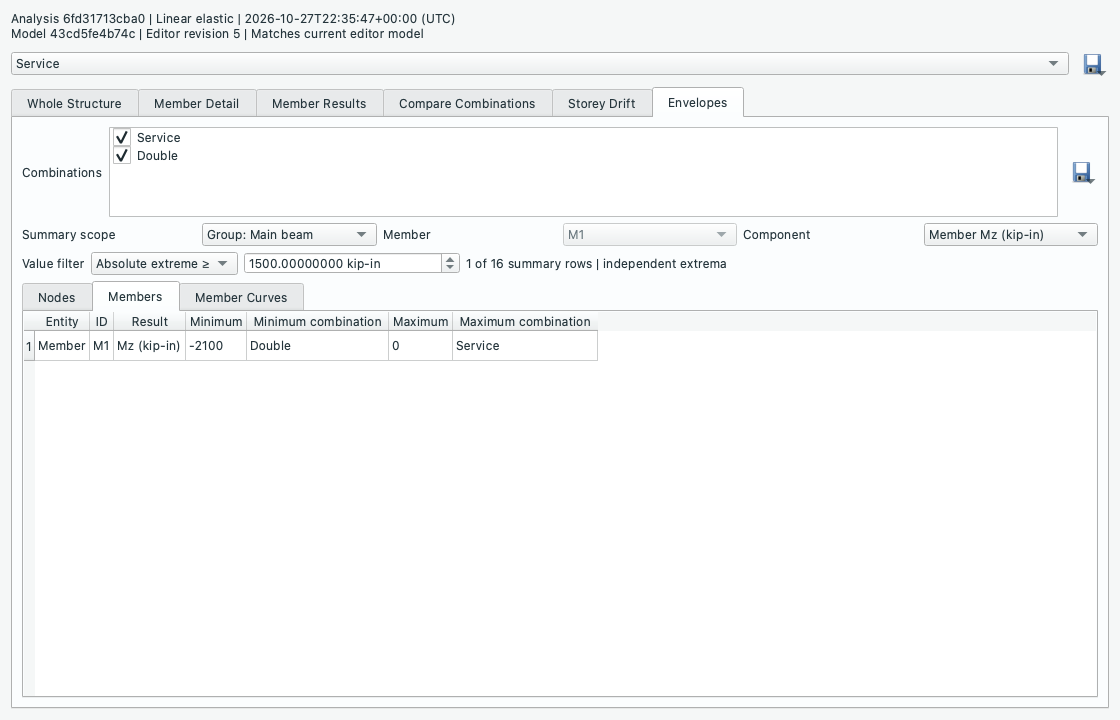
Governing stations (development after RC2)
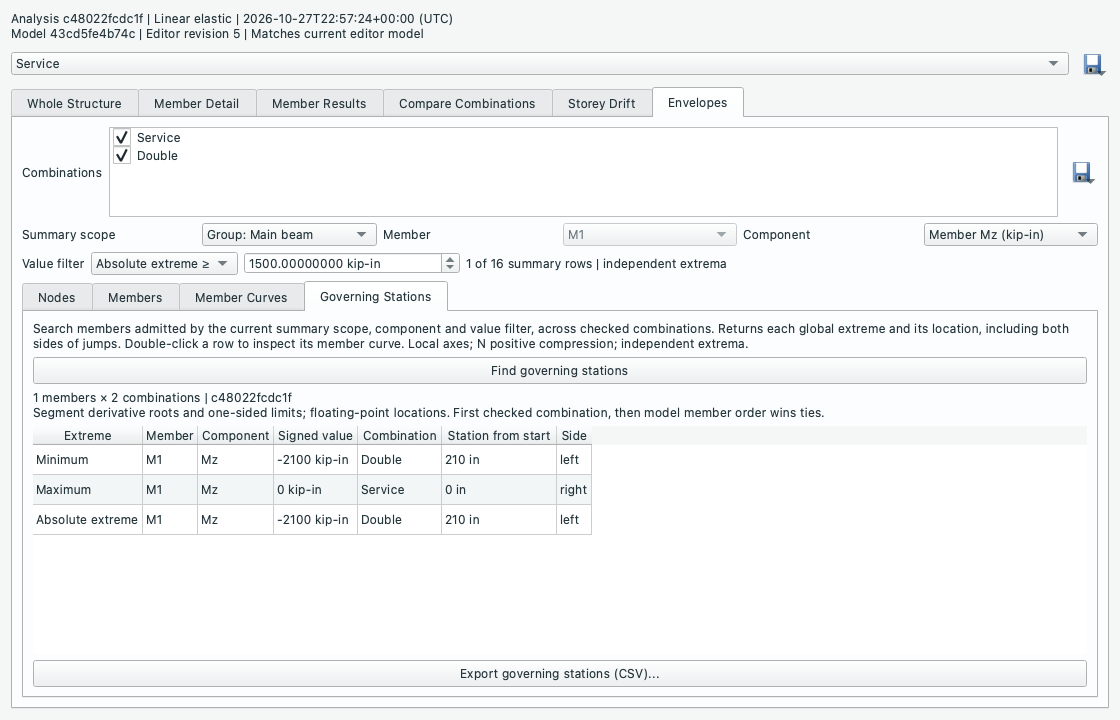
In Envelopes, choose one Member component in the summary filters, then open Governing Stations > Find governing stations. The scope and value filter admit member IDs using the existing summary rows; the query then searches each admitted member's full span across the checked combinations. It reports global minimum, maximum and absolute extreme, retaining signed values, member ID, governing combination, distance from member start and Left/Right/Interior side. The threshold selects members, not threshold-crossing locations. Both sides of point-load/moment jumps and physical-submember boundaries are evaluated directly. Double-click a row to set the existing member curve, component, station and side; the curve still displays all checked combinations, with governing combination identified in the query row. Query CSV includes scope/member IDs, units, combination factors, analysis method, snapshot identity and numerical query method.
The search obtains stationary points from derivatives of the engine's continuous segment formulas, including the quadratic-denominator P-little-delta recovery. It uses normalized polynomial/rational reconstruction with floating-point roots and independent residual checks, rather than the plotted sampling grid or the engine's 100-point deflection-extrema scan. Singular/non-finite segments and formulas outside the verified contract fail with an explanation. Axial-only truss forces/translations use their supported constant/straight fields. Ties within numerical tolerance retain the first checked combination, then the first member in model order and first candidate station. Queries are limited to 5,000 member/combination pairs. Filter, combination and unit changes clear query rows and disable export until the search is repeated. No analysis is run or modified.
Plain storey drift
The Storey Drift tab in retained 2D/3D diagram windows starts empty. Choose a lower node, upper node and horizontal global direction, then Add pair. Repeat for each storey and column you want to check. Global Y defines elevation; the upper node must have a strictly greater Y coordinate. Pairs may be offset in plan and are never inferred to belong to a rigid floor. 2D supports X drift; 3D supports X or Z. Duplicate pair/direction entries and invalid heights are rejected without losing existing pairs. Select any row and Remove selected pair to remove that pair across all combinations.
For each pair and selected combination the table reports height h, the lower and upper nodal translations, their signed difference Δ = u_upper − u_lower, and the dimensionless signed ratio Δ/h. Governing |ratio| marks the largest absolute ratio for that pair/direction; its row retains the actual signed value and combination. The first analyzed combination wins ties. Select one solved combination or all; this selector is independent of the window's main selector. All values come from the same retained snapshot and method. Unit changes convert lengths while leaving ratios and pairs unchanged. Pair selections belong to the window and are not saved as model definitions or groups.
This is static displacement post-processing. It applies no seismic-code amplification or limit, provides no pass/fail decision and adds no solver constraints. Export CSV records exactly the current table, with source basename, snapshot ID/time/signature, method, units and conventions. Exports are atomic; a failed write preserves an existing destination.
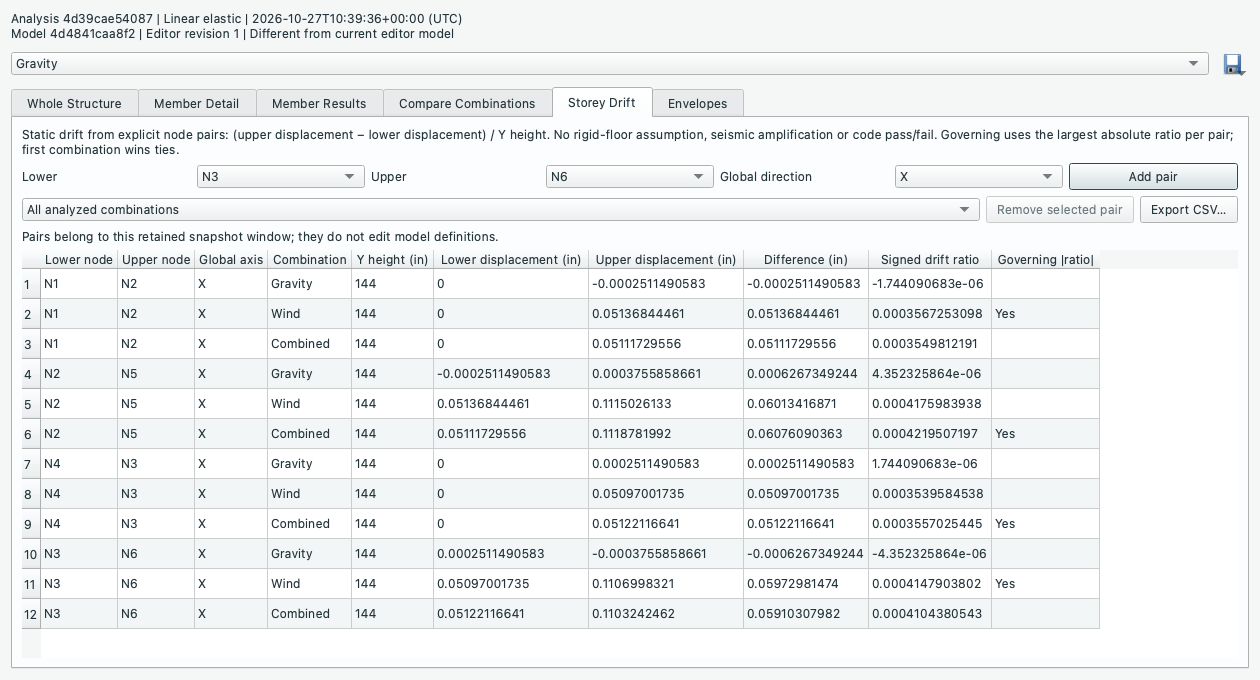
Each column has its own lower/upper pairs; the table makes no rigid-diaphragm assumption.
Source: GUIDE.md. This manual follows the current repository; the published rc1 wheel has a smaller feature set.