Slab Placement and Main-Model Surfaces¶
Surfaces start as geometry only; rectangular Quad slabs offer explicit experimental coupled analysis. In a New 3D Frame or an existing spatial project, choose Tools > Surface Meshing (Experimental), or Add Surface in the unselected model inspector. Generate the mesh and choose Apply to 3D Model. All seven generators are supported. In a 2D project the tool remains a separate recipe workspace; it does not silently convert the model to 3D.
The main viewport displays surface faces and element edges beside frame members, with orbit, orientation gizmo, Fit and PNG export. Click a face or select its entry under Surfaces. The inspector's Edit Surface reopens the full recipe editor; apply commits one undo step. Renaming requires a unique name distinct from frame nodes, members and loads. Delete removes the selected recipe, with undo/redo; mixed selections and Select All include surfaces. View > Surface Geometry hides/shows meshes without changing the project. In 3D Select mode, Box Selection or Shift-drag includes whole surface recipes. Left-to-right selects meshes wholly enclosed by the rectangle; right-to-left selects any mesh whose projected faces intersect it, including a box wholly inside a face. Ctrl/Command adds to the existing selection; Escape cancels. Openings are empty space, hidden surfaces are excluded, and no mesh elements or generated solver nodes become editable entities. Boxes use undeformed geometry and projected faces rather than depth/occlusion, so several storeys can be selected together. Use the tree for an exact floor selection when projected slabs overlap.
Placement without typing XYZ: a new Rectangle mesh first uses a valid selected boundary, otherwise the highest complete horizontal frame level. The geometry preview includes the reference frame (toggle Frame to hide it). Under Fit rectangle to, choose Frame level and select the desired elevation, or Selected boundary after selecting four rectangular corner nodes or all perimeter members in the main model. Split perimeter segments are supported; their intermediate stations become control lines. Node selection also supports global XY and YZ rectangles, not just horizontal XZ slabs. The fit tool updates origin, plane, width and height together, with preview undo/redo.
Existing surfaces are never moved automatically when edited. Select the desired fit source to reposition one; use Manual coordinates for independent numeric editing. Only complete axis-aligned rectangles are inferred. Open perimeters, tilted/irregular outlines, diagonal selections and L-shaped extents are not filled as bounding boxes. Levels with interior beams may use their complete outer perimeter; select a specific bay's corners/perimeter to fit just that bay. Fitting preserves material, thickness, target size and openings/control lines. Incompatible openings/control lines or excessive mesh density reject the fit without changing the recipe. Coordinates and dimensions use the selected input units.
Placement is a one-time geometric fit, not a live constraint: subsequent frame edits do not move the surface. Refit explicitly if the frame changes. Touching geometry does not merge nodes or enable coupled analysis.
The project owns mesh recipes, not additional frame joints. Generated nodes and four-node connectivity are regenerated deterministically and retained in a bounded geometry cache. With coupled analysis disabled, coincident nodes are not connected and different meshes may overlap for geometry exploration. Editing/remeshing/deleting a surface does not alter frame nodes, members, loads or supports. Surface material definitions remain recipe-local rather than references into the frame material library.
Version 20 spatial project files include recipes, coupled-analysis opt-in and
surface pressures by load case. Version 19 geometry projects migrate with analysis
disabled and no pressures. Normal save/open,
autosave/recovery, unit changes, model-table edits, undo/redo and MCP frame edits
retain them. Projects are limited to 16 surface recipes and 4,096 pre-opening
elements in total, in addition to the existing 1,024-element per-mesh limit and
generation checks. The separate .pynitemesh recipe files remain available.
Coupled rectangular slabs (experimental): select a surface and check Coupled analysis (experimental) in Properties. This project-wide option includes every surface; all must be Rectangle/Quad. Choose Pressure case, enter the signed uniform pressure and Apply Pressure. Zero removes that case's pressure. Positive pressure follows the displayed local normal: +Z for XY, -Y for XZ and +X for YZ. Pressure uses force per geometry-length squared (for example kN/m2), not the independent material stress units.
Try File > Examples > Slabs > 3D Frame and Slab - Coupled Pressure (Experimental), then Analyze. The 240 by 180 inch slab carries 0.001 kip/in2 downward, giving 43.2 kip total and 10.8 kip vertical reaction at each base in the Gravity combination. This example replaces the frame-only gravity line loads, rather than double-counting the same slab load. Uplift is a separate negative-pressure case.
At each solve, the adapter shares coincident surface/frame and conforming
mesh-to-mesh vertices within 1e-8 inches. No nearest-face ties, rigid offsets
or proximity links are created. Frame centreline geometry must agree with the
slab mid-surface. PyNite physical members subdivide at shell nodes along their
axes, preserving the user member ID and load stations. Beam-axis collinearity
also must satisfy the locked engine's stricter 1e-12*(1+L) tolerance; near misses
are rejected, not assumed connected. Original model nodes inside unsplit user
members still require Connect Intersections.
Axial-only truss members touching intermediate surface nodes must be split
explicitly there; solver-only truss subdivision is rejected to preserve releases.
Member diagrams and left/right station inspection retain the force jumps at
mesh-to-beam connections instead of smoothing across them.
Mesh vertices must match all frame joints touching a face. Use rectangle control lines at intermediate supports or beam lines; an opening cannot retain support where the surface has been removed. Hanging/nonmatching mesh nodes, overlapping coplanar faces, beams cutting faces without grid intersections, ambiguous joints and disconnected components block the solve. There is no automatic remeshing or node-to-face constraint. Refit/remesh after moving the frame, then analyze again.
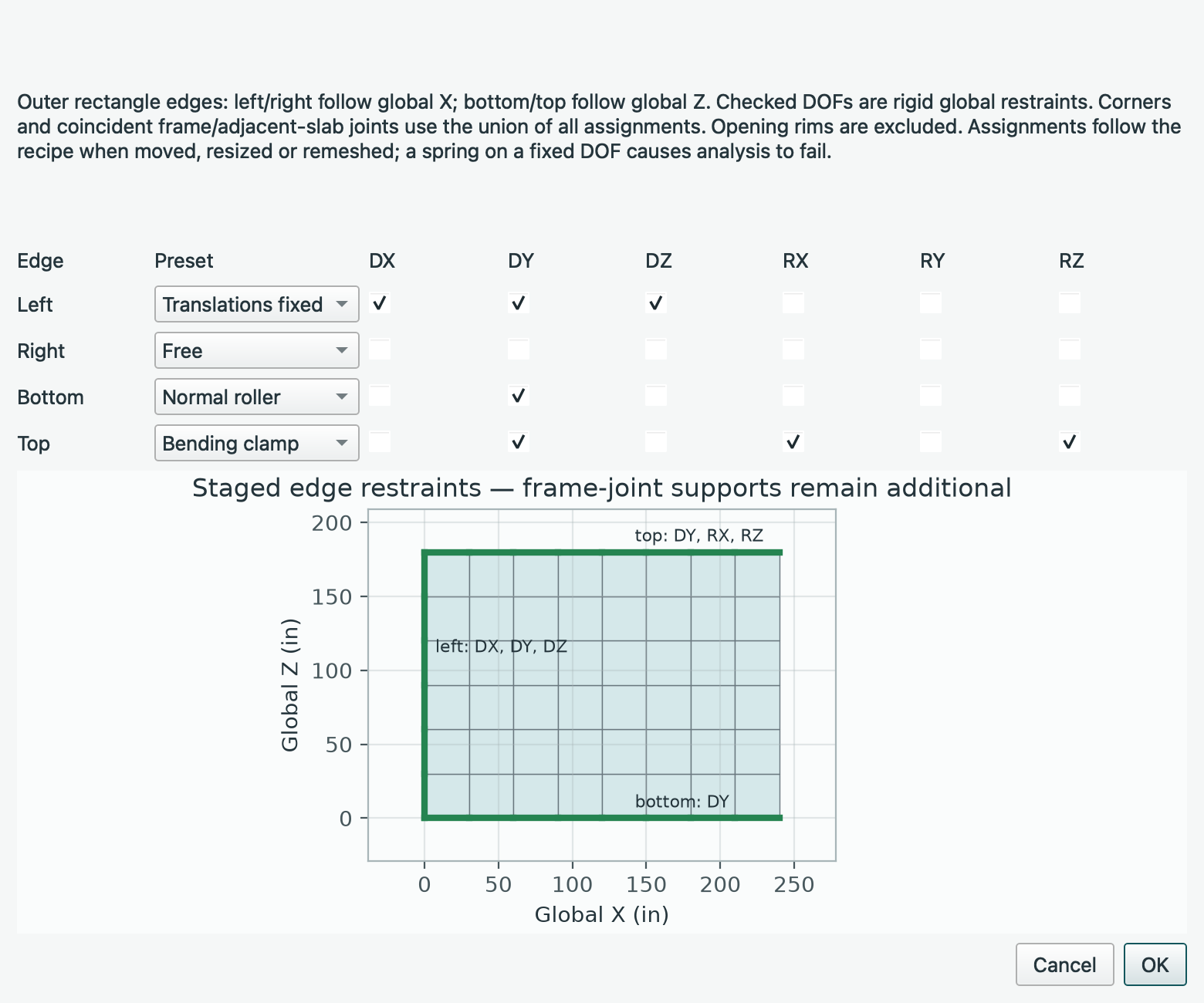
Slab supports come from existing shared model joints and their six-DOF restraints or springs, plus explicit Edge Supports… in the selected slab's Properties. The editor previews four outer edges with global DX/DY/DZ/RX/RY/RZ checkboxes and Free, Normal roller, Bending clamp, Translations fixed and Fixed presets. Left/right follow the rectangle's width direction, bottom/top its height direction; the preview names the global axes. Normal roller restrains only the transverse translation; Bending clamp additionally fixes the two tangential rotations. In-plane stability must be provided explicitly. Opening rims are not selected. At corners and coincident frame/adjacent-slab nodes, restraints are the union of all owners. A spring on a fixed DOF causes analysis to fail rather than disappearing. Assignments belong to geometry, so moving/resizing/remeshing reapplies them to the current outer material boundary. Renaming transfers them, deletion removes them, and Accept creates one undoable edit; Cancel leaves the model unchanged. Supported outer segments are marked in the 3D viewport and frame reports when Supports is enabled, and listed in report definitions. These assignments are inactive while the project is geometry-only; such projects cannot be analyzed. There are no hidden plate-pilot constraints. Quad membrane/bending stiffness and the engine's drilling approximation are retained. The weak drilling approximation can produce global moment imbalance under lateral/membrane loading. Every combination must pass independent force/moment equilibrium before any coupled snapshot is accepted. Tolerances are not relaxed to accommodate drilling imbalance; failing models return an error, not apparently valid results. General lateral/membrane behaviour needs further validation. Material weight density contributes slab weight in global -Y when project self-weight is enabled, using the same case/factor as frame self-weight. Do not separately enter that weight as pressure unless intentional.
Results include original and generated solver-node translations/rotations and
support reactions in the tables/CSV, member forces, independently integrated
force/moment equilibrium, and amplified slab mesh deformation. Generated
__S... nodes are result-only, not editable project joints. The inspector shows
the selected surface's peak nodal translation magnitude. Reports include surface
pressure/edge-support definitions and mesh outlines. Select a solved slab and use
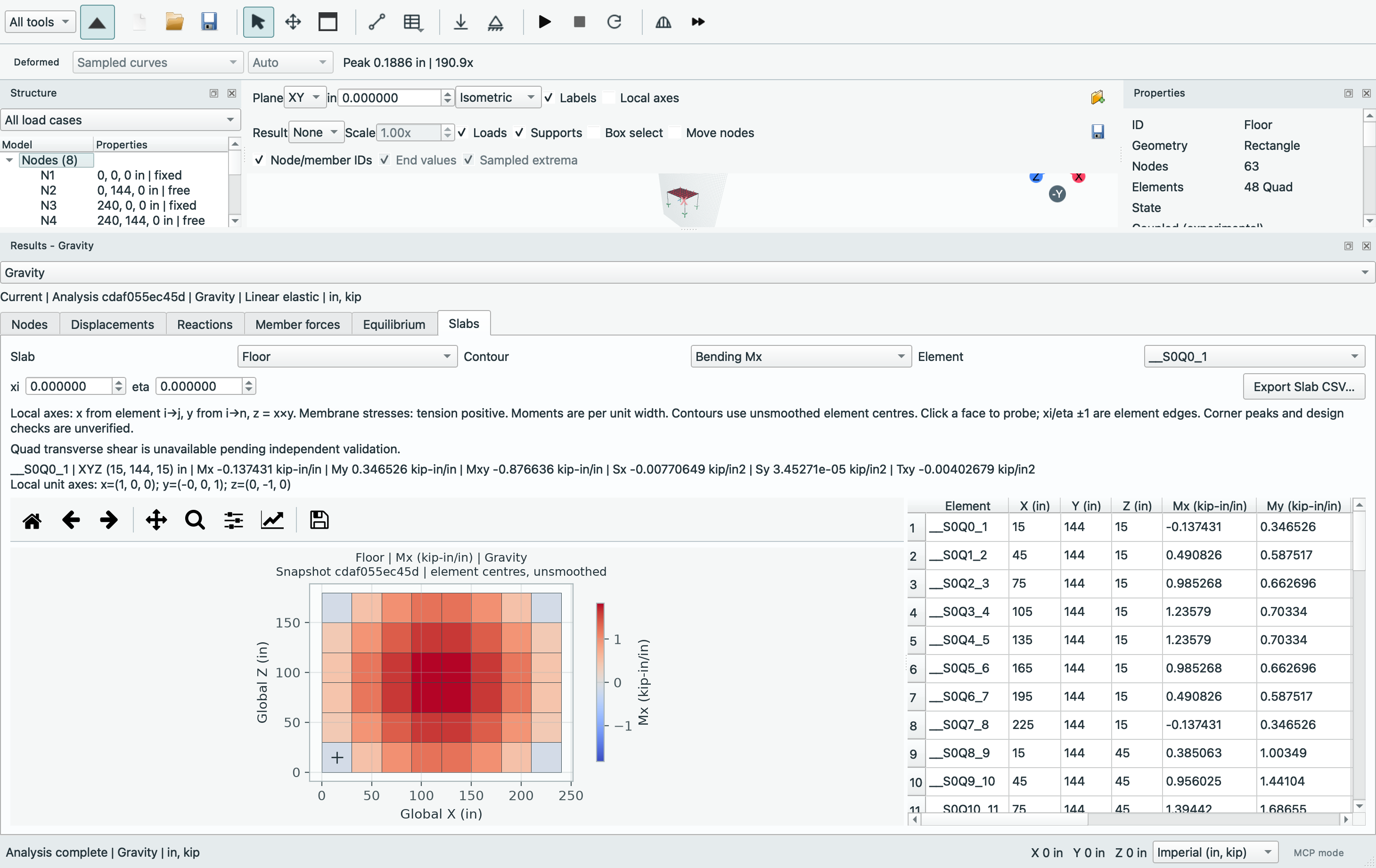
Inspect Slab Results, or open Results > Slabs in the existing Results dock.
Choose the slab, Mx/My/Mxy bending moment per unit width, or Sx/Sy/Txy membrane
stress (tension positive). Local x runs i→j, local y runs i→n, and z=x×y;
each probe prints the three global unit vectors. Moment labels use moment/length
(for example kN-m/m), while membrane stress follows material stress units (MPa).
Colours use a symmetric signed scale for the selected combination, with one
unsmoothed value per element centre. Opening holes remain blank; no nodal averaging
or artificial smoothing crosses a material boundary.
Click a face to probe its natural coordinates, choose an element from the table,
or enter xi/eta in [-1,1]; zero is its centre and ±1 its edges. At an interface,
choose the element explicitly to inspect either side. The plot is a centre-value
contour even when the numerical probe is elsewhere. The existing combination
selector and unit controls refresh the view without changing the snapshot.
Engineering edits clear the tab and data. Export Slab CSV writes all element
centres with units, local axes, surface, combination, snapshot/time and model
signature; the plot toolbar saves the contour with its snapshot title.
MCP read_results(kind="surface_elements", surface_id="Floor", ...) exposes the
same centre table, with ordinary pagination, combination and snapshot guards.
Quad transverse shear is unavailable: raw PyNite 3.0/3.2 Qx/Qy recovery fails
an independent simply supported thin-plate Navier check under refinement. Neither
this tab nor its CSV/MCP output presents those numbers. Quad plate-pilot shear
plots are disabled and analyze_plate returns shears=None for Quad; corrected
Rect shear remains separate. A validated recovery method is still pending.
Constant-strain/constant-curvature manufactured recovery checks cover all three planes, origins and natural-coordinate probes. A coupled edge-supported 120-inch square plate with a negligible-stiffness perimeter beam uses 30/15/7.5-inch meshes against an independent Navier series: fine interior Mx/My/Mxy relative L2 errors are below 0.6%, and peak deflection error is below 0.5%; support forces balance. The beam stiffness is retained, not subtracted. These bending checks do not validate general membrane/drilling response or sharp corner peaks. Every combination still must pass global equilibrium, including after changing edge restraints; even a pressure-loaded asymmetrically clamped frame/slab can be rejected for drilling moment imbalance. Shear connectors, eccentric/composite offsets, combined face stresses and design checks remain pending. Reproduce this bounded comparison, including diagnostic raw-shear errors (not production result data), with:
uv run python -B scripts/benchmark_coupled_surfaces.py --output /tmp/coupled-plate.json --figure /tmp/coupled-validation.png
Solved membrane/interface checks (development after RC4): the same report now includes applied-traction membrane solutions, beam/slab load sharing and a separate raw-engine drilling diagnostic. These are bounded verification cases:
| Check | Independent reference and observed scope |
|---|---|
| Membrane extension, Poisson contraction and shear | Constant edge tractions on a 120 × 80 × 0.8 in rectangle; exact plane-stress affine displacement/stress, not prescribed solver displacements. Three scalar in-plane restraints remove rigid modes; outer edges restrain normal displacement. Three meshes in XY/XZ/YZ, translated origins, signed and zero combinations match to numerical precision. An off-plane frame anchor at the zero-motion corner carries no membrane load. |
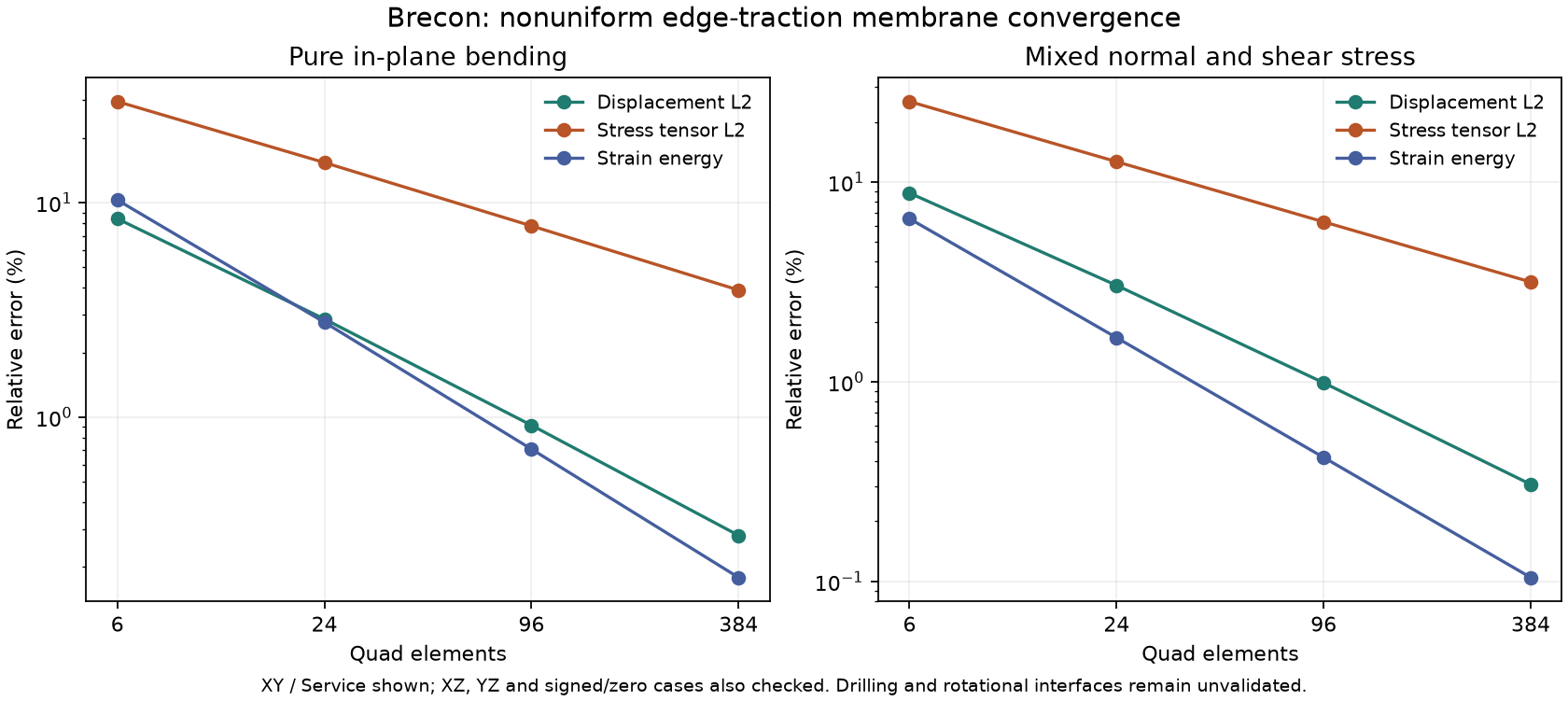
| Nonuniform in-plane bending and mixed normal/shear stress | Two independent Airy plane-stress fields on the same rectangle, loaded by consistent edge tractions. Four meshes (6/24/96/384 Quads) in XY/XZ/YZ and signed/zero combinations pass unchanged global force/moment equilibrium. Fine displacement L2 errors are below 0.31%, stress-tensor L2 errors below 4% and strain-energy errors below 0.18%, all decreasing under refinement. No solved displacement is prescribed; the corner frame anchor remains unloaded. |
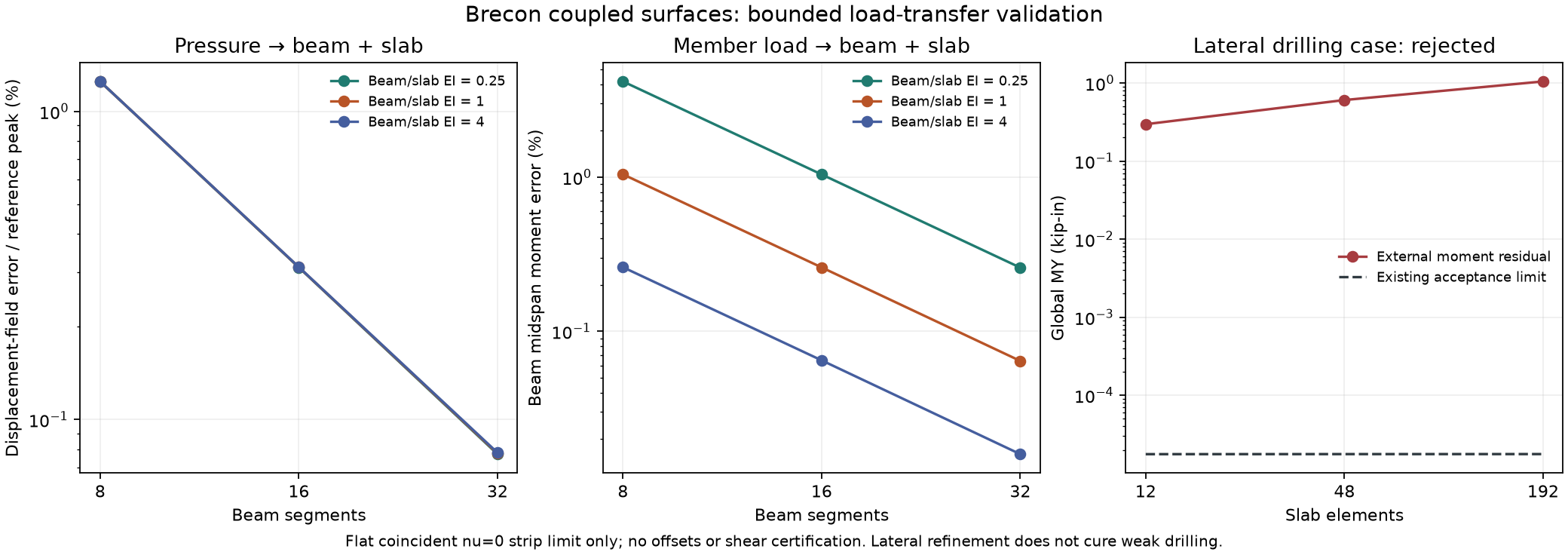
| Pressure or member load transferred between a beam and slab | A 240 × 12 × 0.6 in, nu=0 slab strip with a coincident centreline beam, simply supported ends and beam/slab EI ratios 0.25, 1 and 4. Compare both load paths against the independent narrow-strip rigidity sum EI = Eb Ib + Es b t³/12. Under refinement from 8 to 32 beam segments, fine displacement-field error is below 0.1% of reference peak, beam midspan moment error below 0.3% and slab Mx relative L2 error below 0.15%. This is a slender-strip limit, not an exact finite-width or eccentric/composite-section reference. |
| Weak drilling under lateral loading | Raw engine diagnostic only: a loaded frame/slab's missing external MY moment matches its summed weak local drilling torque. On 12/48/192-element meshes the residual grows from about 0.296 to 0.604 to 1.046 kip-in, far above the existing approximately 0.000018 kip-in limits. The actual application rejects every case; refinement alone is not a remedy. |
The raw drilling diagnostic is isolated in the benchmark; it does not bypass the application's acceptance gate or expose rejected engineering results to the UI/MCP. No drilling stiffness or equilibrium tolerance is changed. General diaphragm/wall action, rotational frame–shell interfaces and corner stress peaks still require independent validation. Quad shear remains unavailable.
Nonuniform reference details: local coordinates are 0 <= x <= L,
-H/2 <= y <= H/2, with L=120 in, H=80 in, t=0.8 in, E=3600 ksi, nu=0.2
and C=0.001 kip/in³. The independent references use Airy potentials
phi = -C*y³/6 and phi = C*x*y²/2, giving (Sx, Sy, Txy) = (-C*y, 0, 0)
and (C*x, 0, -C*y), respectively. Both satisfy zero-body-force equilibrium;
compatible plane-stress displacements and closed-form strain energies are in
tests/nonuniform_reference.py. The method follows
Bower, Applied Mechanics of Solids §5.2.
Exact integration of linear edge traction times edge shape functions preserves
the applied end moments. Only u(0,-H/2), v(0,-H/2) and u(0,+H/2) are
restrained in-plane. Normal-displacement edge supports suppress out-of-plane motion.
The report integrates displacement-vector and symmetric stress-tensor relative
L2 errors with 3 × 3 Gauss quadrature, including both shear tensor entries;
strain energy is external work/2 compared with the closed-form reference.
Checks also cover translated origins, alternate Poisson ratio, unit metadata and
file round-trips. The continuum spin (dv/dx-du/dy)/2 is nonzero while PyNite's
independent nodal drilling rotations stay zero. Passing these traction fields
therefore does not validate moment-connected diaphragms or fix the rejected
lateral drilling case. Reproduce the separate bounded report and figure with:
uv run python -B scripts/benchmark_nonuniform_membrane.py --output /tmp/nonuniform-membrane.json --figure /tmp/nonuniform-membrane.png
Rectangle width/height axes are XY: X/Y, XZ: X/Z and YZ: Z/Y, following the mesh generator. Left/right mean minimum/maximum width coordinate; bottom/top mean minimum/maximum height coordinate. Development corrects swapped YZ edge-support and contour axes; non-square recipes, off-centre probes and boundary notches now have dedicated regressions. Review YZ edge assignments created by earlier development builds when upgrading. The file schema and named edge semantics are unchanged.
Manual, live, MCP and direct solver analysis use the same opt-in and element-family
guards. With analysis disabled, any surface (even hidden) blocks a frame-only
solve; MCP reports surface_geometry_only. With it enabled, the worker validates
connectivity, solves the combined stiffness and checks finite results/stability
and independent force/moment equilibrium for every combination.
MCP reads and atomic batch edits support recipes, pressure maps and coupling
opt-in. A coupled candidate reuses the production interface/conformity checks once
after the entire batch; invalid edits preserve the model, results and undo history.
Editing does not solve or certify stability/equilibrium; those remain analysis gates.
Nonrectangular generators and Rect elements remain geometry-only in the main
model. The separate plate workspace below retains its independent Quad/Rect
bending workflow. Initial regressions cover slab-to-column load transfer,
combinations, self-weight, invalid interfaces and classical square-plate deflection;
independently verify mesh convergence and engineering results before relying on them.
Source: GUIDE.md. This manual follows the current repository; the published rc1 wheel has a smaller feature set.