Maintaining the illustrated manual
The user-facing entry is docs/index.md. Short task pages live in
docs/start/, docs/modeling/ and docs/use/. Existing method/API/evidence pages
remain the technical reference. The plain Markdown remains readable without a
site builder. Do not present planned work as a current UI feature.
Build and read locally
Use the existing root environment:
uv pip install --python .venv/bin/python -e ".[docs]"
.venv/bin/python -m examples.documentation build
.venv/bin/python -m examples.documentation check
The optional extra pins Zensical 0.0.73. The application does not import it and
training does not depend on it. Generated files stay under ignored build/manual/.
F1 / Help → User manual opens build/manual/site/index.html in the browser. No
site is published or remote account configured by these commands.
The build stages copies of maintained Markdown and assets, rewrites local links only in those copies, performs a strict Zensical build, and checks rendered local links, images and section anchors. Root README/instructions/attribution are copied as project reference; linked source files are available as reference downloads. Edit the original files, never generated staging copies.
For an HTTP preview:
.venv/bin/python -m examples.documentation serve
Open http://127.0.0.1:8765. Stop with Ctrl+C. This serves a fresh build; rerun
after editing sources. The same site also opens directly from disk. Theme fonts
and search assets are local. The small MIT iframe-worker shim needed by offline
search is pinned and bundled under assets/vendor/iframe-worker/ with its license.
Capture screenshots
.venv/bin/python -m examples.capture_manual
# Only when deliberately replacing this manual's named images:
.venv/bin/python -m examples.capture_manual --overwrite
The helper captures 22 actual Qt states, uses Window(state_directory=False),
releases clipboard data and verifies one default 1D baseline run, model save and
run/checkpoint save. It never touches personal layout/recovery state. Captures
live under assets/screenshots/manual-*.png; the manifest records tool/image
hashes, environment, parent revision and run settings. Captions describe actions
and expected UI behaviour, not an accuracy guarantee.
Keep menus and labels consistent with the application. Inspect screenshots at full size and verify their placement in the rendered manual. Use descriptive alt text and a full-size image link. Use repository-relative example paths: public screenshots/snippets must not include usernames, home folders or hostnames. Do not modify heatmap behaviour for illustrations.
Inspiration and scope
The local PyniteGUI manual provided the organisational example: a searchable Zensical site, short workflow pages, screenshots beside actions, and separate reference/project material. Margam's text, capture/build helpers and configuration were written for this repository. No PyniteGUI source, prose or screenshots were copied. Its checkout remains unchanged.
Browser checks should cover page navigation, search, images, light/dark themes and opening the local-file build. Qt checks cover the F1 shortcut, missing-build message and browser-launch failure handling. A successful build alone does not establish UI help integration or scientific solution accuracy.
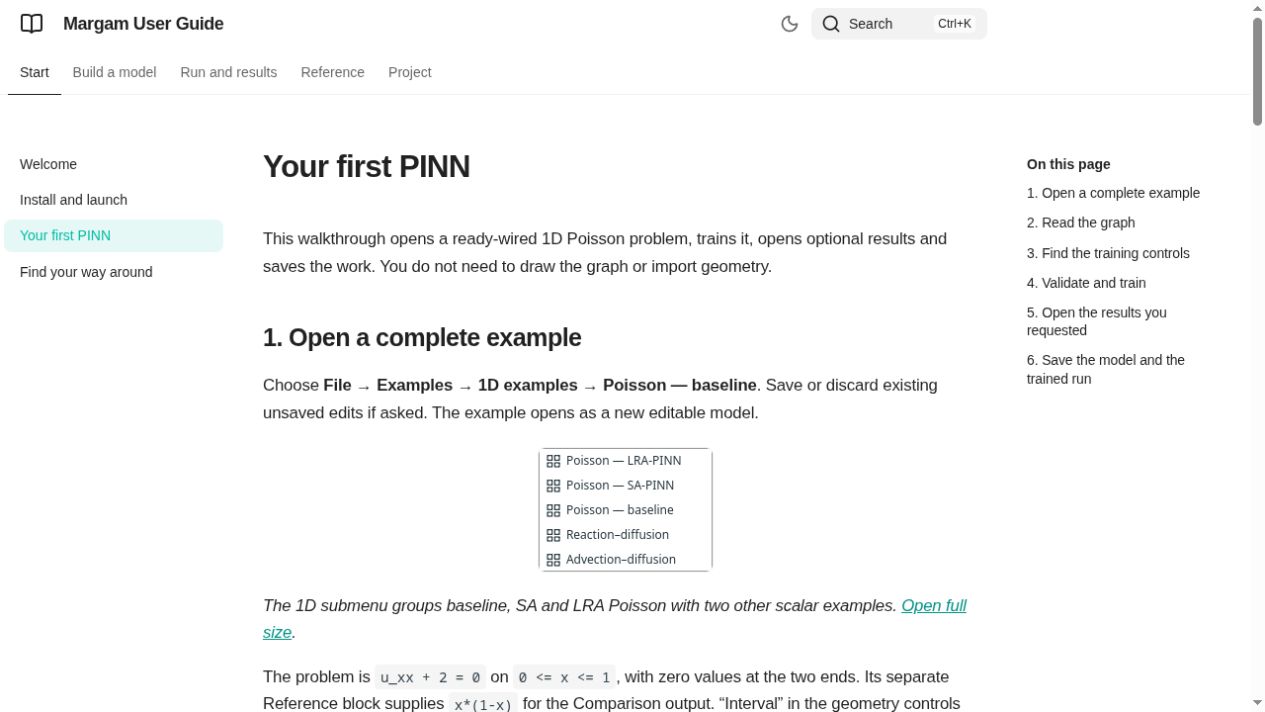
The browser preview was checked over localhost: navigation, a ParaView search, result navigation, image rendering and the theme toggle. The in-app test browser does not allow file URLs, so direct-file offline search was not exercised there. The offline configuration and bundled local search shim are checked separately.
Publish the manual on GitHub Pages
The Publish user manual workflow builds this same checked site on pushes to
main, uploads build/manual/site, and deploys it to GitHub Pages. Pull requests
only build/check the guide; they do not deploy. The build installs the pinned docs
extra only, without the desktop or numerical dependencies.
One-time repository setting:
- Open Settings → Pages.
- Under Build and deployment → Source, select GitHub Actions.
- Push the workflow change, or run Actions → Publish user manual → Run workflow on main after the change is present there.
- Wait for both build and deploy to finish, then open the Pages URL.
Selecting Deploy from a branch → main → /docs does not run Zensical. It
publishes the Markdown source instead of the generated sidebar/search interface.
The built site is deliberately ignored by Git; do not commit it into docs/ or
replace the authored Markdown with HTML. Local builds remain local; publishing
happens through the separate workflow. Site URL includes the repository prefix
so navigation and search resolve beneath /Margam/.