Evaluate at your own points
Use Evaluation points when you want predictions at specific coordinates: measurement locations, FEM nodes or points prepared by another tool. Use the separate Reference data block when you also have numerical/reference values. Neither block changes the points used to train the PINN.
Try the working example
Open File → Examples → 1D examples → Supplied evaluation points · 1D. The example is wired with four deliberately unsorted points and a separately ordered analytical reference. Click Validate, then Train PINN. Double-click Comparison to see predictions, reference values and signed errors. Views stay closed until requested; training writes no export files.
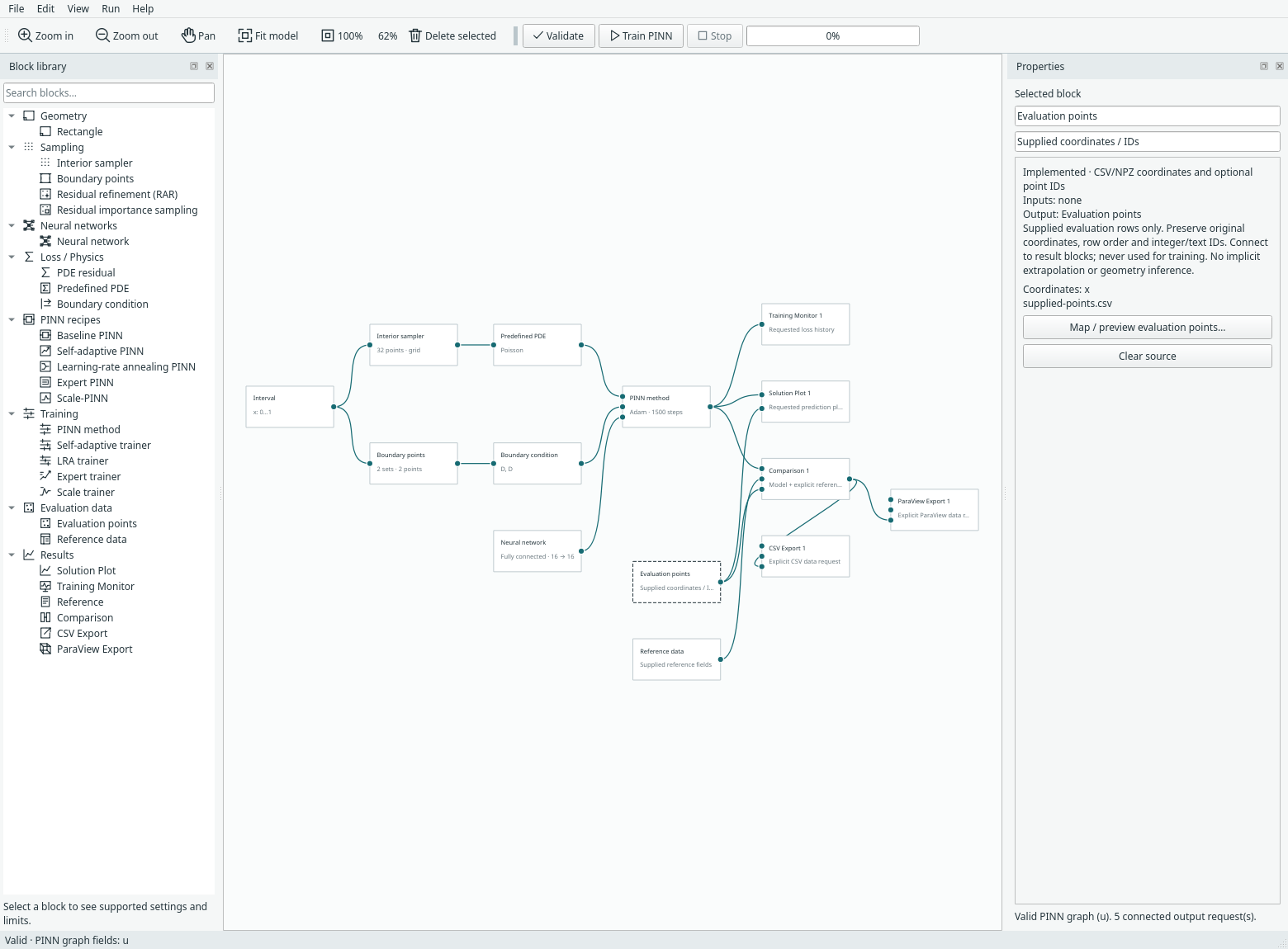
Actual desktop example. Evaluation data has its own library category. The two source blocks are independent of the interior and boundary training samplers.
Connect the blocks
- Add Evaluation data → Evaluation points and map a CSV or NPZ file in its inspector. Connect it to the points input of Solution Plot, Comparison, CSV Export or ParaView Export.
- Keep the trainer/compact recipe connected to the output's model input.
- For comparison, add Evaluation data → Reference data, map coordinates and field values, then connect it to Comparison's reference input.
- To export the comparison, connect Comparison's output to the export block's comparison input. This carries the same points, IDs, predictions and errors. Choose either this route or a direct model/points route on that export block.
Without an Evaluation points connection, an output keeps its regular evaluation grid. Its per-axis resolution is ignored when supplied points or a comparison feed it. The older Reference block remains available for expressions, preset references and existing saved models.
Map a file explicitly
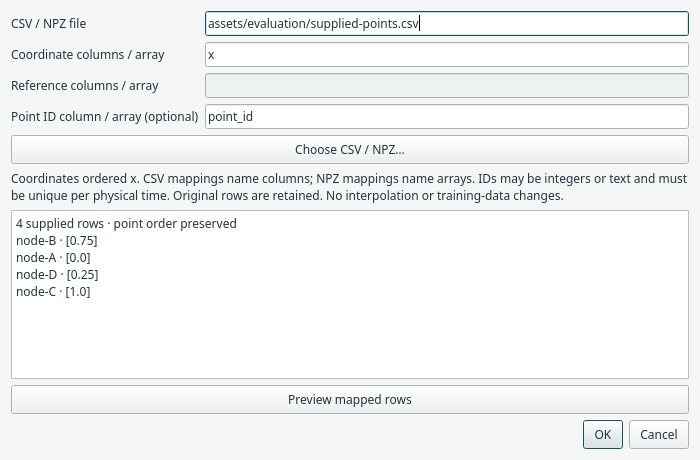
For CSV, enter comma-separated column names in model order: x, x,y, x,t or
x,y,t. A transient coordinate is physical time, never a training-update number.
Reference columns follow the model's field order: u, u,v,p or the explicitly
labelled torus u,v,w fields (where w is vorticity).
For example, evaluation points might be:
point_id,x
node-B,0.75
node-A,0.0
node-D,0.25
node-C,1.0
Map coordinates to x and the optional ID column to point_id. A separate
reference CSV may have these rows in a different order, with an extra u column;
map that column in Reference data. See the bundled
point CSV and
reference CSV.
For NPZ, the entries name arrays instead of columns. Coordinates must be an N×D real array; reference values must be N×F (or N for a scalar). An optional ID array must be one-dimensional integer or text data. Object arrays and pickle loading are rejected. CSV IDs remain text, including leading zeros; NPZ integer IDs retain their integer precision, including values larger than 2⁵³.
Each source is limited to 100,000 rows and 64 MiB (including expanded NPZ data). Coordinates/values must be finite and match the current model dimensions, fields and bounds. Points inside a built-in solid cylinder are rejected. No physical 3D geometry, unit conversion or mesh connectivity is inferred from the file.
Reference alignment and errors
When both sources supply IDs, reference rows are matched by ID and physical time, then their coordinates are checked. IDs must be unique within a time frame; a node ID may recur at a different physical time. Without IDs on both sides, coordinates must uniquely identify each row. Repeated coordinates require IDs on both sources. Both sources must describe the same number of matching rows.
Missing IDs, mismatched coordinates, duplicate keys or incompatible field counts are validation errors. There is no nearest-neighbour matching, interpolation or silent dropping of points. Predictions retain the evaluation source's original row order. Values use the model's units; convert them before import if needed.
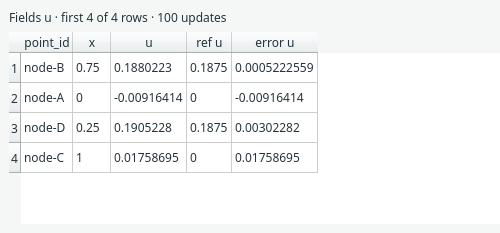
The demo after 100 CPU updates. This is evidence of the data workflow, not a solution-accuracy benchmark. The table displays the first 200 rows; saved/exported outputs retain all rows. Signed error is prediction minus reference. Comparisons also record RMSE and maximum absolute error, with per-field metrics for vectors.
Evaluate without retraining
After training, change only the evaluation/reference mapping or requested outputs, then choose Run → Evaluate outputs (also available from output context menus). Margam reuses trained weights and preserves the optimizer checkpoint and update count. Changing the PDE, network, geometry or training configuration requires a new training run. Evaluation never starts automatically after editing a file.
Saved run archives contain evaluated rows and source fingerprints. Reopen them and view/export the recorded outputs even if source files are unavailable. To evaluate new points, the current mapped evaluation/reference files must exist. Weights-only prediction can reuse a saved checkpoint without reopening its old training-data files; resuming training retains its existing data checks.
Export the same rows
CSV Export writes source_row (zero-based original row), optional point_id,
coordinates and predicted fields. Comparison-fed exports also include ref_u,
error_u, and equivalent columns for other fields. It preserves original order.
ParaView Export writes supplied steady points as .vtu vertex cells, without
inventing mesh connections. Predicted/reference/error fields and source_row
are point arrays. Canonical integer IDs that fit Int64 also appear as a point_id
array. All IDs, including text and leading-zero strings, are preserved losslessly
as UTF-8 JSON bytes in the UInt8 FieldData array point_ids_json_utf8; use CSV for
a directly readable text-ID column. This is not a native VTK string point array.
Transient exports produce .pvd collections of VTU frames ordered by the supplied
physical times. A frame retains original row order, global source_row indices
and IDs. Point counts and locations may vary between frames. Time is removed
from spatial coordinates; there is no implicit temporal resampling. Keep the
companion frame folder beside the PVD and open the PVD for playback in ParaView.
GUI playback was not exercised for this new supplied-point dataset.
Direct GeoSampler import, original FEM cells/connectivity, region labels and explicit unit metadata remain future work.
Reproduce the checks
Run from the repository root with its existing environment:
python -m examples.evaluation_points --device cpu --output-dir /tmp/margam-evaluation-cpu
python -m examples.evaluation_points --device cuda --output-dir /tmp/margam-evaluation-cuda
python -m examples.capture_evaluation --overwrite
The CPU record and CUDA record retain configuration, point order/IDs, source hashes and values after 100 training updates. Both confirm zero additional optimizer updates and unchanged trained state during evaluation. The capture manifest records the illustrated UI evidence. Tests cover shuffled references, large integer/text IDs, invalid mappings, offline archives, evaluation reuse and variable-point physical-time VTU/PVD exports.
Keep data with the project
Choose Copy into project or Link existing file in the mapping dialog. Copies travel with the model's companion folder, recovery and run archives; links remain dependent on their original location. New sources default to Copy, while existing linked sources keep Link. No rows, IDs or field mappings are changed. See the illustrated copy/link guide.
View → Project data overview… also lists evaluation and reference sources, their row counts, field/ID mappings and missing/changed-file warnings. It does not replace the normal reference alignment checks. See input diagnostics.