ParaView export
Documentation index · Inputs and future evaluation/export work
Explicit block, no default export
Add Results → ParaView Export and connect a trainer or compact recipe to it.
Set its evaluation resolution, train, then right-click Export ParaView… or use
its inspector button. It writes steady rectangular fields as .vti, channel/cylinder point clouds as .vtu, and space–time predictions as .pvd physical-time series. The Burgers example includes a
connected export block; startup graphs retain opt-in insertion. No file is written by training,
and no viewer is launched. CSV Export remains a separate, unchanged block.
Saved runs retain the requested predictions so they can be exported after reopening.
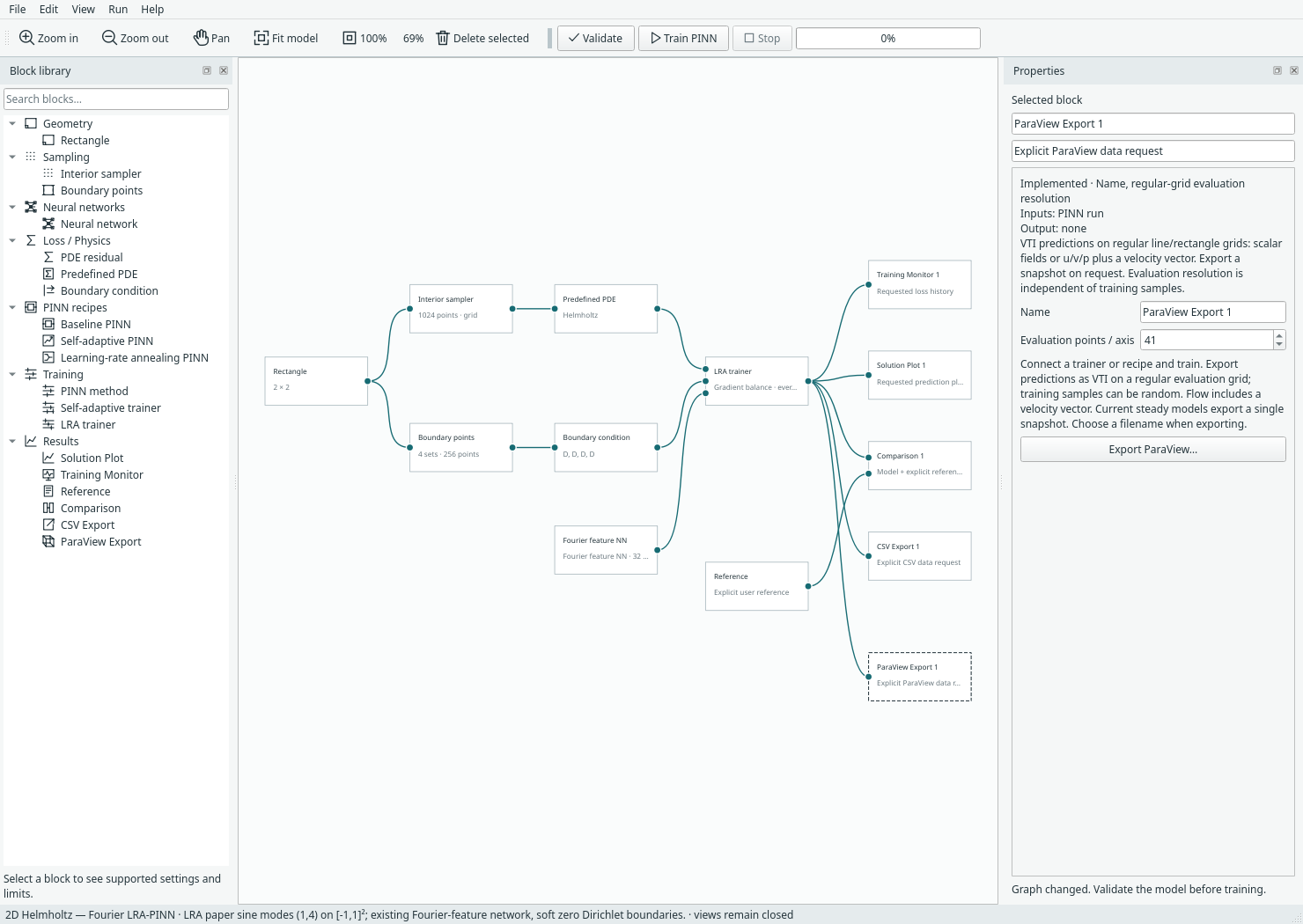
Random training points work. The block evaluates the learned network on its own regular grid. That grid includes the domain endpoints/edges; resolution N means N points on a line or N×N on a rectangle. It does not export training samples by default. Connect the separate Evaluation points block to evaluate supplied CSV/NPZ coordinates and preserve their IDs; see the guide.
Scalar results have point array u; current pressure/velocity flow results have scalar arrays u,
v, p and a three-component velocity=(u,v,0) array suitable for vector filters.
Coordinates retain the model's physical bounds. 2D lies at z=0, not in a fabricated
volume. Comparison-fed exports include reference and signed error arrays.
Material/cell fields, units and mesh connectivity remain deferred; no reference
solution is assumed for direct prediction exports.
VTI, VTU and time
- VTI means uniform structured ImageData: implicit origin, spacing and extents.
- VTU means an unstructured grid with explicit points/cells, not time dependence.
- PVD is a collection of snapshots with explicit physical-time values.
The VTK XML specification
defines ImageData and point arrays. The ParaView animation guide
explains that time-varying inputs supply the timesteps for playback.
Each temporal VTI/VTU also contains a TimeValue field. Times need not be uniformly
spaced and are not network-training updates or epochs. Time is never written as
an extra spatial coordinate. Timestamp units are whatever physical units the
caller supplies; no seconds or other units are inferred.
Steady Margam problems export one snapshot without inventing a time value. The Burgers space–time example exports playable physical-time frames through the same explicit block. The writer API also accepts transient snapshots:
from margam.components.paraview_export import export_pvd

# Each data object contains regular spatial points, prediction values and
# optional field names. The caller evaluates the model at that physical time.
export_pvd('solution.pvd', [(0.0, data_at_t0), (0.125, data_at_t0125), (0.9, data_at_t09)])
This API is ready for a future transient executor; there is no transient UI solver or time-selection control yet. It requires increasing finite times, matching grids and field schemas. It writes one VTI per snapshot and a PVD index referencing them with relative paths. Keep the PVD and companion folder together. ParaView opens the PVD, not individual snapshots, to play the entire series.
Playable test dataset
Standing-wave demo is a known-value
synthetic format test, not a PINN prediction or physics benchmark. It has 21
frames, times 0 through 1, a 21×21 grid on [−1,1]² and scalar field
demo_scalar=sin(pi*x)*sin(pi*y)*cos(2*pi*t). All companion snapshots are included
in that folder. Nonuniform timestamps are covered separately by tests at
0, 0.125 and 0.9.
In ParaView: File → Open the PVD, Apply, colour by demo_scalar, then press Play. Generate another dataset without training:
mkdir -p benchmark-results
.venv/bin/python -m examples.export_paraview_demo --output benchmark-results/playback.pvd
Dependencies, correctness and scope
Runtime needs only the existing NumPy and Python XML/file tools: no VTK, PyVista, meshio or ParaView installation inside Margam. Output is uncompressed ASCII XML. The writer rejects incomplete, irregular or incorrectly ordered grids rather than silently changing their geometry. VTK ordering is x fastest, then y. Writes are staged and replaced atomically; invalid data or a failed index write preserves an existing export. Replacing a PVD uses a new companion folder and retains old companions rather than deleting files that may still be in use elsewhere.
Tests check line/rectangle coordinates, field values, velocity components,
XML escaping, finite values, time ordering, per-frame metadata and rollback on
failure. A real VTK 9.7.1 reader was installed only in an isolated temporary
validation directory; it is not a project dependency or virtual-environment change.
It reads the generated grids, arrays and TIME_STEPS metadata. The full demo is
also checked against its known formula. ParaView itself is not installed on this
host, so its actual graphical Play button has not been exercised here; the PVD
manifest and snapshot time metadata are verified.
.venv/bin/python -m unittest discover -s tests -p 'test_paraview*.py' -v
The optional real-reader test skips if VTK is absent; normal writer/UI tests still run. Model format 12 reads formats 1–11; run archives remain format 2. Existing CSV models/archives retain their behaviour. No viewer embedding, irregular geometry, FEM connectivity export or input-node evaluation is included in this first pass.
Concrete obstacle and 2D transient examples
The Expert suite evaluates 2D spatial frames at each requested physical time. Channel/cylinder exports exclude the disk and use VTU vertex cells, not FEM connectivity. Torus outputs u/v velocity and scalar w (vorticity); its derived velocity vector is (u,v,0). No 3D spatial coordinate is inferred from time.
Supplied-point output
An Evaluation points connection switches the ParaView Export block from its regular grid to supplied coordinates. Steady points use VTU vertices; transient rows use physical-time PVD/VTU frames with original source-row indices and IDs. Comparison-fed exports include reference and signed error arrays. No mesh cells are inferred. See the supplied-point guide for ID encoding, field mappings and current limitations.