Install and launch
Use the repository's single .venv. Run the commands below from your Margam
checkout directory.
Open the application
From the repository root:
.venv/bin/python -m margam.ui
If your terminal already shows (.venv), python -m margam.ui is equivalent.
Do not create another environment inside margam/ui or a documentation folder.
Development currently uses Python 3.14.
Set up a fresh checkout
If .venv does not exist, create it once and install the package:
uv venv --python 3.14 .venv
uv pip install --python .venv/bin/python -e .
uv pip check --python .venv/bin/python
Keep an existing environment in place. You can also activate it with
source .venv/bin/activate, run python -m margam.ui, and use deactivate
when finished. Editable installation picks up source changes. Dependencies are
managed with uv; a separate pip module inside the environment is not required.
For CPU/CUDA installation in this same environment and device checks, see the command reference.
Open this illustrated manual
Choose Help → User manual or press F1. It opens the locally built guide in your browser. Once built, reading and searching the guide does not need internet.
If the app says the manual has not been built, run these once from the repository:
uv pip install --python .venv/bin/python -e ".[docs]"
.venv/bin/python -m examples.documentation build
Press F1 again. The optional documentation tools do not change how PINNs train.
The Markdown pages remain readable directly in docs/.
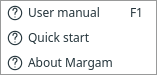
Help provides the illustrated manual on F1 and a short reminder. Open full size.
Next: Run your first PINN.