Export for CSV or ParaView
Add the output block you want from Results, connect it to the trainer or compact recipe, and train. Double-click the block or use its right-click export action to choose a filename. Training alone writes no export file.
Choose a format
| Block | File | Data |
|---|---|---|
| CSV Export | .csv |
Coordinates and predicted scalar or u,v,p columns |
| ParaView Export | .vti |
Regular-grid scalar fields; flow also includes (u,v,0) velocity |
Select the export block to set Evaluation points / axis. A value N requests N points for 1D or N×N for a rectangle. These are independent of grid/random or other training samples. CSV Export remains available alongside the ParaView block.
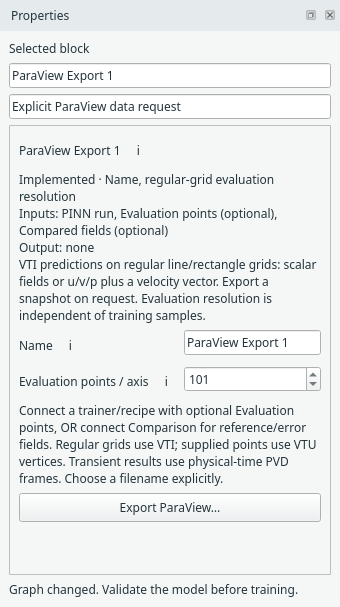
The optional ParaView Export block has its own resolution and explicit export button. Open full size.
CSV exports have x,u, x,y,u, or x,y,u,v,p columns. Comparison-fed CSV exports additionally include reference values and signed
pointwise errors. Training losses remain in the monitor/run archive.
Use a saved run when you also need training state and recorded output histories.
Open a VTI snapshot
In ParaView, open the exported .vti, click Apply and choose a field for colouring.
VTI means a uniform grid. VTU means an unstructured grid, not a time-dependent
version of VTI. Steady problems write one snapshot; Burgers writes physical-time frames. It does not infer physical time from training updates.
Try time-series playback
The known-value playback dataset
contains 21 changing synthetic snapshots. Open its PVD in ParaView, Apply, colour
by demo_scalar, then Play. Keep its companion snapshot folder beside it.
This is a file-format test, not a trained PINN result. Snapshot fields and time
metadata were read back with VTK; GUI playback has not been exercised on this host.
The Burgers space–time example now uses the block to write physical-time PVD collections directly. Its evaluation resolution sets the spatial and temporal counts. The Expert examples also support 2D transient flow exports. Read the ParaView format guide for the exact scope.
Evaluate supplied points
Use the separate Evaluation points block for CSV/NPZ coordinates and optional IDs. Add Reference data for matching numerical values, connect it to Comparison, then connect Comparison to an export block to include reference/error arrays. Supplied steady points use VTU vertex cells; transient points use physical-time PVD/VTU frames. See the illustrated supplied-point guide. Mesh connectivity and direct GeoSampler integration remain future work.
For Burgers, CSV headings are x,t,u. ParaView Export writes a
PVD collection of 1D spatial VTI frames with physical-time stamps; open the PVD
and press Play. Time is not exported as a spatial axis.