PINN recipes: compact and expanded
A recipe is one reusable method construction, not a complete physics problem.
Keep one file per recipe under margam/recipes/. Implemented recipes are baseline.py, self_adaptive.py, learning_rate_annealing.py, expert.py and scale.py. Each defines the internal components, connections, defaults,
external ports and exposed settings. Both insertion forms use this same file.
Numerical methods remain one file each under margam/methods/; baseline training
is pinn.py. Shared networks, samplers and losses remain in their existing modules.
A recipe composes them instead of copying their implementations. Physics examples
live under margam/templates/ and appear in File → Examples.
For actual screenshots of a configured SIREN/SA pair before and after collapse, see the compact/expanded walkthrough. It also shows that optimiser controls and network controls belong to different blocks.
Using the baseline recipe
Choose File → Insert PINN recipe → Baseline PINN · compact or expanded. The block library's Baseline PINN entry inserts the compact form. Insertion adds components without replacing an existing method: remove the old trainer/network if building on an existing example, or collapse that trainer directly.
The compact form exposes training steps, learning rate and device. It defaults to a seeded tanh fully connected network, loss weights and full-batch Adam training. The selected pointwise architecture and its options are also retained. PDE residual and boundary-condition inputs stay outside. Geometry and sampling also stay outside and can be edited using their existing blocks. Outputs connect to the recipe's PINN run port just as they connect to the original trainer.
Double-click the compact block, use its inspector button, or right-click and choose Expand into components. This opens its two editable components directly on the canvas: Neural network → PINN method. There is no separate nested editor. Choose an architecture, edit widths/seed/options, or delete the network and connect a replacement supported Neural network block. The existing network port contract supplies domain coordinates and scalar u or coupled u/v/p outputs; it accepts the implemented pointwise architectures, not neural operators. Loss weights are edited on the expanded trainer. Adam is currently the only UI optimiser; there is no nonfunctional optimiser selector.
Right-click the trainer and choose Collapse as Baseline PINN to hide it and its connected network. Every component parameter is retained, including custom widths, seed, loss weights and training settings. The method's identifier and external physics/output connections are retained. Expanding places the network beside the trainer; individual layout offsets are not stored in the compact block. Undo restores the exact prior expanded layout and wiring.
A shared network cannot be collapsed, because hiding it would remove another trainer's input. Hard Dirichlet is a distinct method and is not relabelled as this baseline recipe. Unsupported or incomplete graphs still fail validation.
Persistence and checks
Model format 23 stores compact recipes, gPINN/RBA settings and separate data sources while reading formats 1–22. Compact settings contain the complete component parameters; loading a saved model does not replace them with recipe defaults. Copy/paste gives the block a fresh identity. Expand/collapse and expanded insertion are each one undoable edit. They are disabled during training and invalidate previous run data just like other graph edits.
Regression checks cover save/load, clipboard, undo/redo, network replacement, scalar and coupled graph equivalence, training through the compact block, and identical numerical predictions after training compact/expanded configurations from the same seed. Result views remain explicit and closed until opened.
Self-adaptive PINN has its own trainer and recipe file, with the same insertion and expand/collapse interactions. See SA-PINN for its pointwise mask settings, checkpoint contract and numerical evidence.
Learning-rate annealing also has dedicated compact/expanded forms. Its trainer reuses existing networks and adds scalar gradient balancing; see LRA.
Inspector control groups
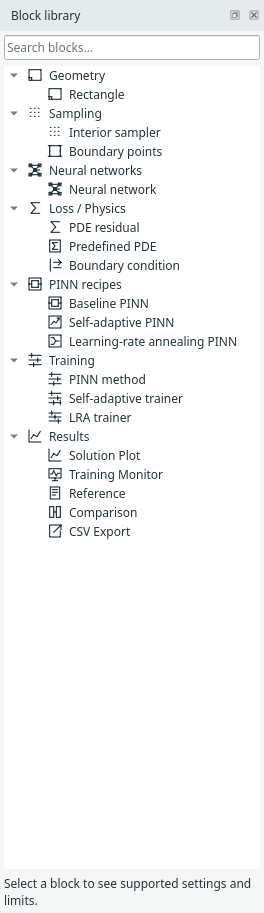
Compact recipes and expanded trainers separate PINN method (variant, loss weights and method-specific adaptation), Optimisation (network Adam learning rate and, for SA, its separate mask Adam ascent rate), and Trainer (update budget and device). These are inspector labels, not new graph blocks or a change to numerical training, recipe ownership or checkpoint format. LRA balancing settings belong to the method; they do not decay Adam's base learning rate.
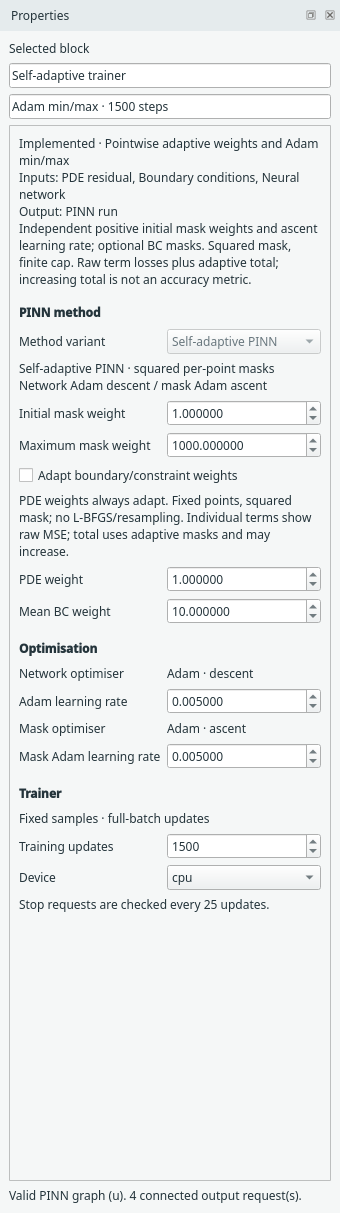
The collapsible block library separates PINN recipes (Baseline, SA and LRA compact constructions) from Training (their expanded method/trainer blocks). Optimisation settings remain in the inspector; no standalone optimiser block is currently implemented. Existing block names, saved models and connections stay valid.
Expert PINN
Expert PINN / Expert trainer use the same compact/expanded recipe contract,
with one definition in margam/recipes/expert.py. This is Margam’s name for the
Expert’s Guide v1 pipeline, not a name used by its authors. The
first runnable case is File → Examples → 1D examples → Burgers — Expert PINN.
Scale-PINN adds its own correction trainer and compact recipe. It stores the previous optimizer iterate and preserves replaceable networks; physical PDE diagnostics remain separate from the corrected training loss.